
aws aurora pricing · aurora · aws
Aurora Pricing: The I/O Line and the 25% Rule
By Aakash Verma ·
How much does Amazon Aurora cost? On Aurora Standard you pay for instance hours (a db.r7g.large is $0.276 an hour), $0.10 per GB-month of storage, and $0.20 per million I/O requests. On Aurora I/O-Optimized the I/O charge disappears, but the same instance costs $0.359 an hour and storage costs $0.225 per GB-month. Aurora Serverless is $0.12 per ACU-hour on Standard and $0.16 on I/O-Optimized. Those are US East (N. Virginia) On-Demand prices from the AWS Price List for AmazonRDS (published November 27, 2026) and the Aurora pricing page, checked November 29, 2026. MySQL and PostgreSQL compatible editions cost the same.
Most Aurora bills are easy to read except for one line, and that line decides which of the two configurations you should be on.
The line that moves: I/O on Aurora Standard
Aurora stores data in a cluster volume shared by all instances, and on Standard every read that misses the instance’s memory and every write to that volume is an I/O request. At $0.20 per million that sounds like nothing, until you look at a busy database: 800 million requests a month is $160, and it grows with traffic, with bigger tables, and with any query that scans instead of using an index.
The clue on the bill is the usage type Aurora:StorageIOUsage. In CloudWatch it’s VolumeReadIOPs and VolumeWriteIOPs. If those climb while CPU stays flat, the working set has outgrown memory, and every query is paying a small toll.
The 25% rule
The Aurora user guide gives a plain rule: I/O-Optimized can reduce costs when I/O is 25% or more of your total Aurora spend, and Standard is typically cheaper below that. It’s a good rule because of how the prices are set. I/O-Optimized adds about 30% to every instance hour and 2.25 times to storage, so it only wins when the I/O it removes is bigger than those two increases.
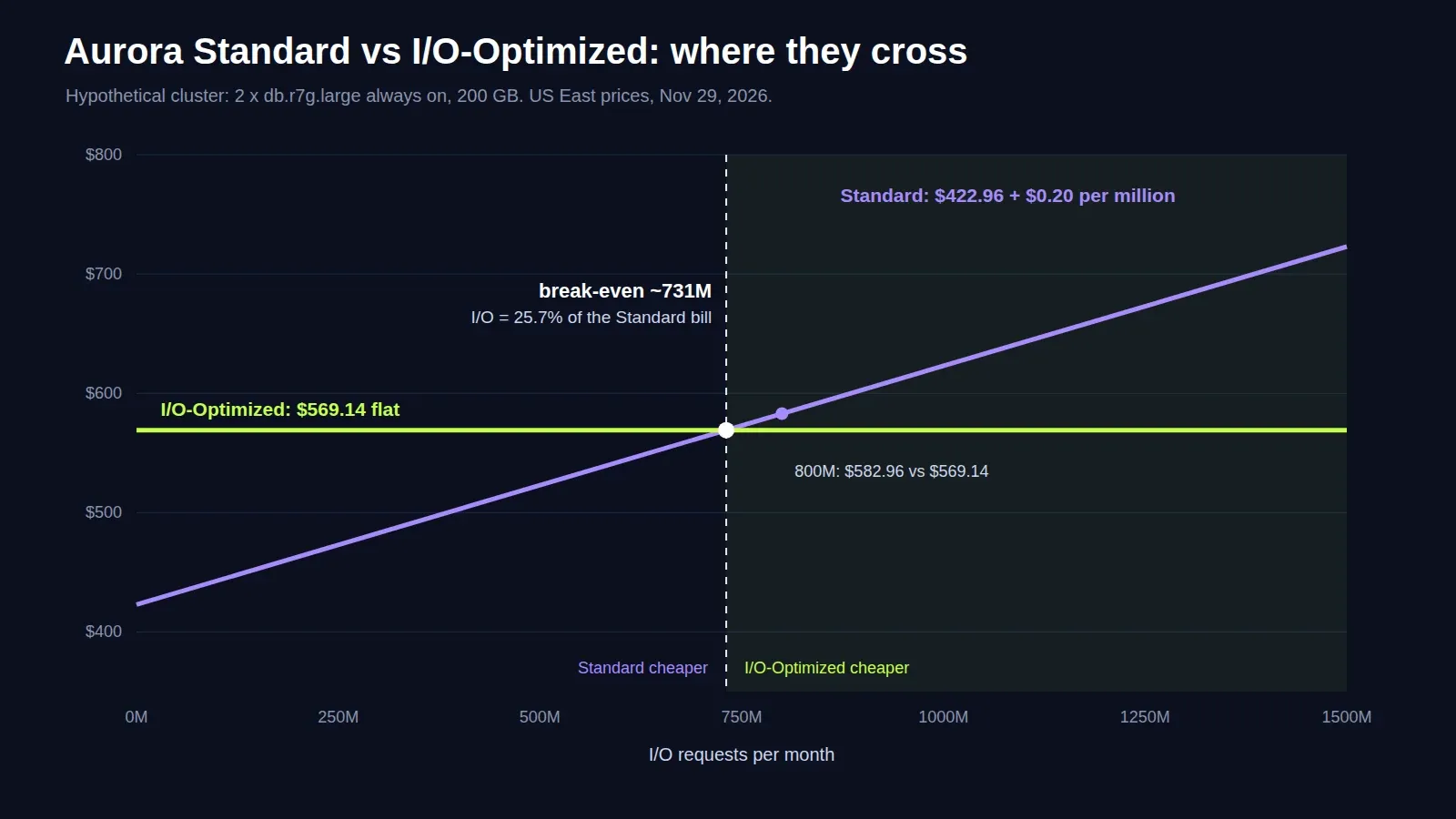
A hypothetical cluster to show it: a writer and a reader on db.r7g.large, always on, 200 GB of data.
| Aurora Standard | Aurora I/O-Optimized | |
|---|---|---|
| Instances (2 x 730 h) | $402.96 | $524.14 |
| Storage (200 GB) | $20.00 | $45.00 |
| I/O (800 million) | $160.00 | $0 |
| Total a month | $582.96 | $569.14 |
I/O is 27% of the Standard bill here, and I/O-Optimized comes out $13.82 a month cheaper. Drop the I/O to 600 million and Standard wins by about $26. The break-even for this cluster is about 731 million requests a month, which is the 25% line almost exactly.
Switching is cheap to try. You can move a cluster from Standard to I/O-Optimized once every 30 days and back to Standard at any time, with no downtime on most instance types (NVMe-based instances need an engine restart, per the same guide).
Before you switch, fix the I/O
Switching configurations changes how the I/O is billed. It doesn’t change why there’s so much of it. Three things usually come first:
- A missing index. One sequential scan on a hot table can be most of a month’s I/O.
pg_stat_statementson PostgreSQL or the Performance Schema on MySQL shows which queries read the most. - An instance that’s too small for the working set. If the buffer cache hit ratio is low, one size up can take the I/O line down by more than the extra instance cost.
- Batch jobs and analytics on the writer. A nightly report that reads everything can be pointed at a reader, or better, at an export.
Serverless: who it’s for
Serverless bills capacity in ACUs, where 1 ACU is about 2 GiB of memory with matching CPU. The minimum you can set is 0.5 ACU, and the pricing page also lists capacity starting at 0 ACU, which is what lets a quiet database pause.
That makes it a good fit for development, staging and spiky workloads. For a database that sits at the same size all day it’s usually dearer than an instance: 4 ACUs around the clock is $350.40 a month on Standard, more than a db.r7g.large ($201.48) with similar memory. A dev database averaging 1 ACU with 50 GB and 20 million I/O requests is about $96.60 on Standard and $128.05 on I/O-Optimized, so small and quiet clusters should stay on Standard.
Lines people forget
- Readers are full instances. Each one is billed by the hour like the writer. A reader nobody queries is just insurance; make sure you want to pay for it.
- Backups beyond the free allowance. Backup storage up to the size of the cluster is free. Manual snapshots kept past retention, and snapshots of deleted clusters, cost $0.021 per GB-month.
- Extended Support. Old engine versions past standard support are billed extra per vCPU-hour (for example $0.10 for Aurora PostgreSQL 13 in years one and two), on top of the instance. Upgrading is the fix.
- Traffic. Replication between Availability Zones is free, but your app servers talking to Aurora across AZs pay normal EC2 data transfer.
Is it worth looking at?
If your Aurora line is under a few hundred dollars and I/O is a small share, leave it on Standard and check the reader count. If I/O is a quarter of the bill or more, price it both ways in our Aurora pricing calculator, which shows the I/O share and the break-even for your cluster. For plain RDS PostgreSQL, the RDS pricing calculator covers that instead.
If the database is one line on a bigger AWS bill, the free cloud cost audit ($0) reads the whole bill and tells you where the money goes. We also cut startup AWS bills for $0 up front: you pay 50% of the verified monthly saving for 6 months, then nothing, and nothing at all if we save nothing. Index and query fixes like the ones above are part of that work.
Want us to look at your bill?
No upfront fee: for six months you pay half of what we save you each month, then you keep all of it. Nothing saved, nothing owed.
Also here: Free cloud cost audit ($0) · Cloud cost optimization services: $0 up front · Reduce your startup's AWS bill · FinOps for startups: $0 audit · Pricing: paid only from verified savings · Move from AWS to a European cloud