
aws · load balancer · pricing
AWS Load Balancer Pricing: The Hour You Pay Before Traffic
By Aakash Verma ·
How much does an AWS load balancer cost? In US East, an Application Load Balancer (ALB) is $0.0225 an hour plus $0.008 per LCU-hour, and a Network Load Balancer (NLB) is $0.0225 an hour plus $0.006 per NLCU-hour. That’s from the AWS Price List file for Elastic Load Balancing published November 19, 2026, which we checked on November 20. An internet-facing one also holds at least one public IPv4 address per Availability Zone, billed at $0.005 an hour each.
So an ALB in two zones costs about $23.73 a month with no traffic at all: $16.43 for the hours and $7.30 for the two addresses. For a lot of small startups that fixed part is most of the line, and the LCU part is pocket change.
How AWS counts an LCU
An LCU is a bundle of capacity, and you’re billed each hour on whichever of its dimensions you used the most of. For an ALB, AWS’s pricing page defines one LCU as any of these:
- 25 new connections a second
- 3,000 active connections a minute (1,500 if you use mutual TLS)
- 1 GB processed an hour for EC2, IP or container targets, but only 0.4 GB for Lambda targets
- 1,000 rule evaluations a second, where the first 10 rules are free
“You are charged only on the dimension with the highest usage.” The other three don’t add anything. A quiet SaaS app pushing 300 GB a month is processing about 0.41 GB an hour, so the bytes come to 0.41 LCU. If it also keeps 1,500 active connections a minute, that’s 0.5 LCU, and 0.5 is what you pay for: 0.5 x 730 hours x $0.008 = $2.92 a month.
The NLB version is the same idea with bigger buckets. Over TCP an NLCU covers 800 new connections a second, 100,000 active connections or 1 GB an hour. UDP halves the connection numbers and TLS cuts them hard, to 50 new and 3,000 active.
Three ALBs for one small app
This one is hypothetical, but we see the shape constantly. A team runs production, staging and a preview environment, each behind its own internet-facing ALB in two zones. Total traffic is the 300 GB and 1,500 active connections above.
- Hours: 3 x 730 x $0.0225 = $49.28
- Public IPv4: 6 addresses x 730 x $0.005 = $21.90
- LCUs: $2.92
That’s $74.10 a month, and $71.18 of it is the three load balancers existing. Put all three environments behind one ALB with host-based rules (app., staging., preview.) and the same traffic costs $26.65. The LCU line doesn’t change at all; you just stop paying twice for idle.
There’s a real trade-off. Staging on the production load balancer means a bad listener change in staging can touch production. A middle ground is one ALB for production and one shared by everything else, which still drops one load balancer and two addresses. Turning preview environments off at night doesn’t help much here, by the way: the ALB bills every hour it exists, so you’d have to delete it.
When the rules cost more than the traffic
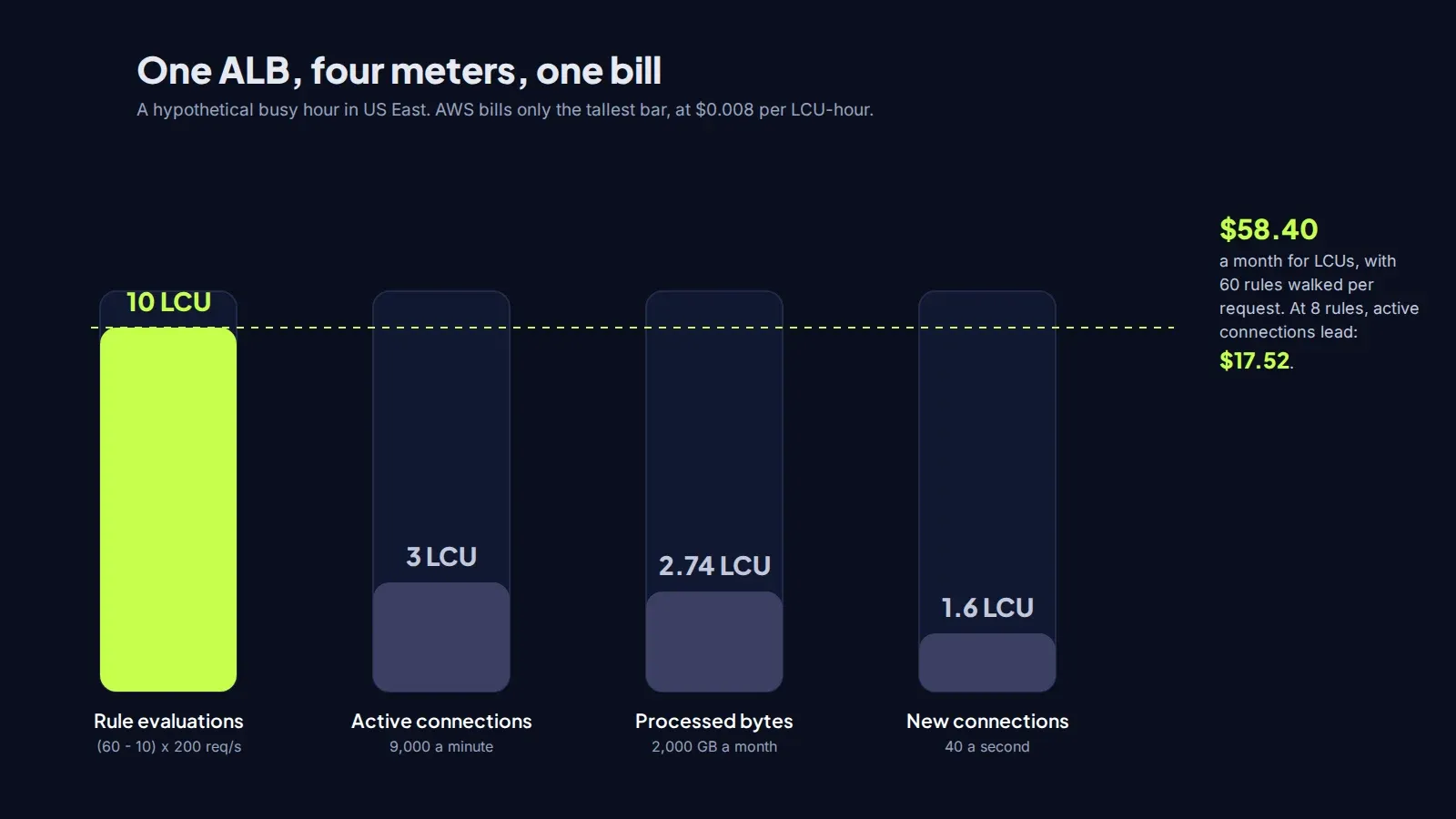
The fourth dimension catches people who route everything through one ALB. AWS counts rule evaluations as the rules processed per request times the request rate, after the first 10.
Take a busier hypothetical app: 200 requests a second, 2,000 GB a month, 9,000 active connections a minute, and 60 listener rules that a typical request walks through before it matches. The rules come to (60 - 10) x 200 = 10,000 evaluations a second, which is 10 LCUs. The active connections are only 3. So the LCU line is 10 x 730 x $0.008 = $58.40 a month, against $17.52 if the rules weren’t the top dimension. Total with the hour and two addresses: $82.13.
The fix is usually boring. ALB walks rules in priority order and stops at the first match, so moving the routes that get most of the traffic to the top cuts the average. The listener rules docs cover priorities and conditions. Getting the average under 10 rules makes the dimension disappear.
Lambda behind an ALB
Lambda targets get the smaller bucket: 0.4 GB an hour per LCU instead of 1 GB. 2,000 GB a month into Lambda through an ALB is 6.85 LCUs, $40.00 a month, against $16.00 for the same bytes going to EC2 or containers. AWS’s own example on the pricing page works out at about $0.34 per million requests for a Lambda-only ALB. If that’s most of your bill, compare it with the API Gateway HTTP API or a Lambda function URL before you assume the ALB is cheaper.
The IPv4 line nobody planned for
AWS started charging for every public IPv4 address in February 2024, and load balancers weren’t exempt: the pricing page says you pay “standard public IPv4 address charges for all the addresses you consume with load balancers.” An ALB in three zones holds at least three, and it can hold more while it scales. That’s $10.95 a month a load balancer for addresses alone. The VPC pricing page lists the rate. Internal load balancers don’t use public addresses, so anything that only serves other services inside the VPC should be internal.
What to check on your own bill
In Cost Explorer, filter the service to Elastic Load Balancing and group by usage type: LoadBalancerUsage is the hours, LCUUsage is the capacity. Public addresses show up under VPC as PublicIPv4:InUseAddress. Then list what you actually run with aws elbv2 describe-load-balancers --query "LoadBalancers[].[LoadBalancerName,Scheme,Type]". Anything that’s internet-facing with no targets registered is $24 a month for nothing.
Our load balancer pricing calculator takes your traffic and the number of load balancers, shows which dimension you’re billed on and what merging them would save. Load balancers are one line on an AWS bill, usually next to idle NAT gateways and unattached volumes. If you’d rather someone else read the whole bill, the free cloud cost audit costs $0, and when we reduce an AWS bill there’s nothing up front: you pay 50% of the verified monthly saving for 6 months, then nothing, and nothing at all if we save nothing.
Want us to look at your bill?
No upfront fee: for six months you pay half of what we save you each month, then you keep all of it. Nothing saved, nothing owed.
Also here: Free cloud cost audit ($0) · Cloud cost optimization services: $0 up front · Reduce your startup's AWS bill · FinOps for startups: $0 audit · Pricing: paid only from verified savings · Move from AWS to a European cloud