
aws · s3 · pricing
AWS S3 Pricing: What 1 TB Really Costs in 2026
By Aakash Verma ·
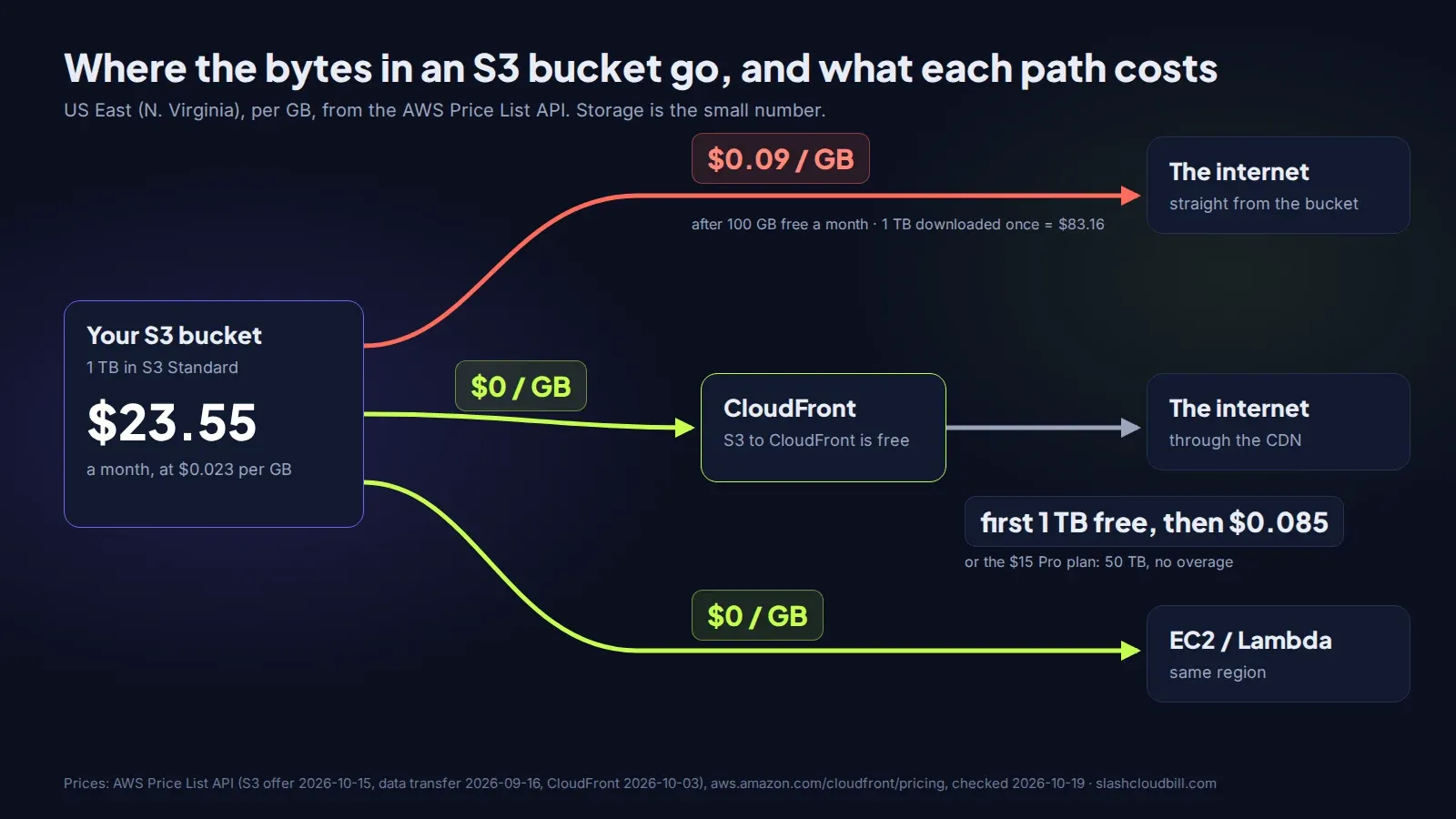
Storing 1 TB in Amazon S3 Standard costs $23.55 a month in US East (N. Virginia): 1,024 GB at $0.023 per GB. Letting people download that terabyte once straight from the bucket costs another $83.16, because data transfer out to the internet is $0.09 per GB after the first 100 GB each month (AWS Price List API, S3 offer published October 15, 2026, checked October 19).
That’s the whole trick of S3 pricing. Storage is cheap and nobody worries about it. The bill grows from the two lines under it: requests and data leaving AWS.
The three lines on every S3 bill
Storage is priced per GB-month, and it’s prorated by the hour, so a file that sits there for half a month costs half. S3 Standard is $0.023 per GB for the first 50 TB, $0.022 for the next 450 TB and $0.021 above that. For most startups only the first number matters.
Requests are priced per thousand. PUT, COPY, POST and LIST cost $0.005 per 1,000. GET and everything else costs $0.0004 per 1,000. That sounds like nothing until you meet an app that lists a bucket on every page load, or a thumbnail generator that writes six sizes of every upload. Ten million LIST calls a month is $50, for an operation that usually shouldn’t exist. Read-heavy is fine: 10 million GETs is $4.
Data transfer out is where the money goes. The AWS S3 pricing page lists it per GB: free for the first 100 GB a month across your whole account, then $0.09 for the next ~10 TB, $0.085 to 50 TB, $0.07 to 150 TB and $0.05 above that. Data going into S3 is free. Data moving from S3 to EC2 or Lambda in the same region is free too.
What 1 TB costs in each storage class
Same terabyte, same region, storage line only:
| Storage class | Per GB-month | 1 TB a month | The catch |
|---|---|---|---|
| S3 Standard | $0.023 | $23.55 | none |
| Standard-Infrequent Access | $0.0125 | $12.80 | $0.01 per GB to read it back, 30-day minimum, 128 KB minimum per object |
| Glacier Instant Retrieval | $0.004 | $4.10 | $0.03 per GB to read, 90-day minimum |
| Glacier Flexible Retrieval | $0.0036 | $3.69 | minutes to hours to restore, 90-day minimum |
| Glacier Deep Archive | $0.00099 | $1.01 | up to 12 hours to restore, 180-day minimum |
The minimums are what catch people. Delete a file from Glacier Instant Retrieval after 10 days and you’re still billed for 90. Put a bucket full of 20 KB thumbnails into Standard-IA and each one is billed as 128 KB, so the “cheaper” class can cost more than Standard. Infrequent Access is for backups, exports and old uploads you’re fairly sure nobody will open this month. If you don’t know your access pattern, Intelligent-Tiering starts at the Standard price and moves objects down by itself, for a small monitoring fee per object.
Downloads: put CloudFront in front of the bucket
A worked example, hypothetical but computed from the real prices: an app stores 1 TB of user photos and its users download 2 TB of them a month.
Served straight from S3, that’s $23.55 for storage plus (2,048 - 100) × $0.09 = $175.32 for transfer, about $199 a month before requests.
Served through CloudFront, the S3 to CloudFront hop is free, and CloudFront’s pay-as-you-go free tier covers the first 1 TB out and 10 million requests every month. The second terabyte is billed at CloudFront’s US rate of $0.085 per GB, so transfer drops to about $87. CloudFront also has flat-rate plans now: Pro is $15 a month with a 50 TB data transfer allowance and no overage charges, according to the CloudFront pricing page. For this app that’s $23.55 + $15, about $39 a month instead of $199.
We built a CloudFront pricing calculator that runs this comparison for your own numbers, pay-as-you-go against each flat-rate plan.
Three ways S3 bills go wrong
The first is egress you didn’t know about. Public file links that point straight at bucket.s3.amazonaws.com, a mobile app that re-downloads the same images on every launch because nothing sets Cache-Control, or a data team pulling exports to a laptop every morning. Turn on S3 Storage Lens or check Cost Explorer grouped by usage type, and look for DataTransfer-Out-Bytes.
The second is versioning without a lifecycle rule. Versioning is a good idea. Versioning on a bucket where the app overwrites the same object every few minutes means every old copy is still stored and billed. A lifecycle rule that expires noncurrent versions after 30 days fixes it. Do the same for incomplete multipart uploads, which sit there invisibly and cost storage.
The third is NAT Gateway, which isn’t S3 at all. Instances in a private subnet that reach S3 through a NAT Gateway pay NAT’s per-GB processing charge on every byte. A free gateway endpoint for S3 in the VPC removes it. It shows up on the EC2 part of the bill, which is why nobody connects it to S3.
Pricing your own bucket
Our Amazon S3 pricing calculator adds up storage, requests and transfer for your numbers. If the S3 line on your AWS bill doesn’t match what you expected, the free bill review is where we look at the actual usage types and tell you which of the above it is, for $0. If S3 is one of several lines that grew, we reduce startup AWS bills for a share of the saving and nothing up front.
Want us to look at your bill?
No upfront fee: for six months you pay half of what we save you each month, then you keep all of it. Nothing saved, nothing owed.
Also here: Free cloud cost audit ($0) · Cloud cost optimization services: $0 up front · Reduce your startup's AWS bill · Pricing: paid only from verified savings · Move from AWS to a European cloud