
aws savings plans · aws cost · ec2
AWS Savings Plans: Commit to Your Quietest Hour
By Aakash Verma ·
AWS Savings Plans give you a lower rate on EC2, Fargate and Lambda in exchange for a promise to spend a fixed number of dollars every hour for one or three years. The discount is real: an m7g.large in us-east-1 costs $0.0816 an hour On-Demand and $0.0599 on a one-year Compute Savings Plan with no upfront payment, 27% less (AWS price list, published November 18, 2026, checked November 19). The catch is that the hourly promise is charged every hour, used or not. Commit to the wrong number and the plan costs more than not having one.
The four plans
AWS’s Savings Plans FAQ lists four kinds:
| Plan | Up to | Covers | Terms |
|---|---|---|---|
| Compute | 66% off | EC2 in any family, size, region or OS, plus Fargate and Lambda | 1 or 3 years |
| EC2 Instance | 72% off | One instance family in one region (for example m7g in N. Virginia) | 1 or 3 years |
| Database | 35% off | RDS, Aurora, DynamoDB, ElastiCache and other database services, generation 7 and newer | 1 year only |
| SageMaker | 64% off | SageMaker ML instances | 1 or 3 years |
You pay No Upfront, Partial Upfront (at least half at purchase) or All Upfront, and All Upfront gets the lowest rate. The “up to” numbers are for three years, all upfront, on the instances with the biggest discounts. For the m7g.large the real range is 27% (one year, no upfront) to 54% (three years, all upfront) on Compute, and 34% to 61% on EC2 Instance.
How AWS applies the commitment
The commitment is a dollar amount per hour at the discounted rate. Each hour, AWS takes your eligible usage, applies the plan to the usage with the highest discount first, stops when the commitment runs out, and bills the rest at On-Demand. Reserved Instances are applied before any Savings Plan, and EC2 Instance plans before Compute plans. The Savings Plans user guide is short on this one and worth quoting: “Each hour’s commitment can only be used within that hour and cannot be carried over.”
That sentence is the whole article, really. A quiet night does not bank anything for a busy afternoon.
A hypothetical service, three commitments
Take a SaaS app that runs 6 m7g.large instances all day and night and adds 6 more for 10 busy hours a day. Over a 730-hour month:
- No plan: $506.33 On-Demand.
- Commit to the 6 always-on instances ($0.3594 an hour, one-year Compute, no upfront): $411.28. The daytime extras stay On-Demand. That’s $95.05 a month saved, about $1,140 a year.
- Commit to the peak of 12 ($0.7188 an hour): $524.72. More than On-Demand. For 14 hours a day you pay the discounted rate for 6 servers that are switched off.
Move the same service to a three-year Compute plan, all upfront, and the 6-instance commitment brings the month to $313.61, but you hand AWS $5,928.77 on day one. At that discount (54%) the peak commitment comes to $329.38, still worse.
There’s a simple rule hiding in this. Committing to cover one more server pays off only if that server runs a bigger share of the day than the plan’s price ratio. On a one-year no-upfront Compute plan the ratio is $0.0599 / $0.0816 = 73%, so the server has to run more than about 17.6 hours a day. On a three-year all-upfront EC2 Instance plan (61% off) the bar drops to 39%, about 9.5 hours, which is why our 10-hour daytime servers would just about be worth covering there, by under $8 a month. That’s a thin margin to lock in for three years on one instance family.
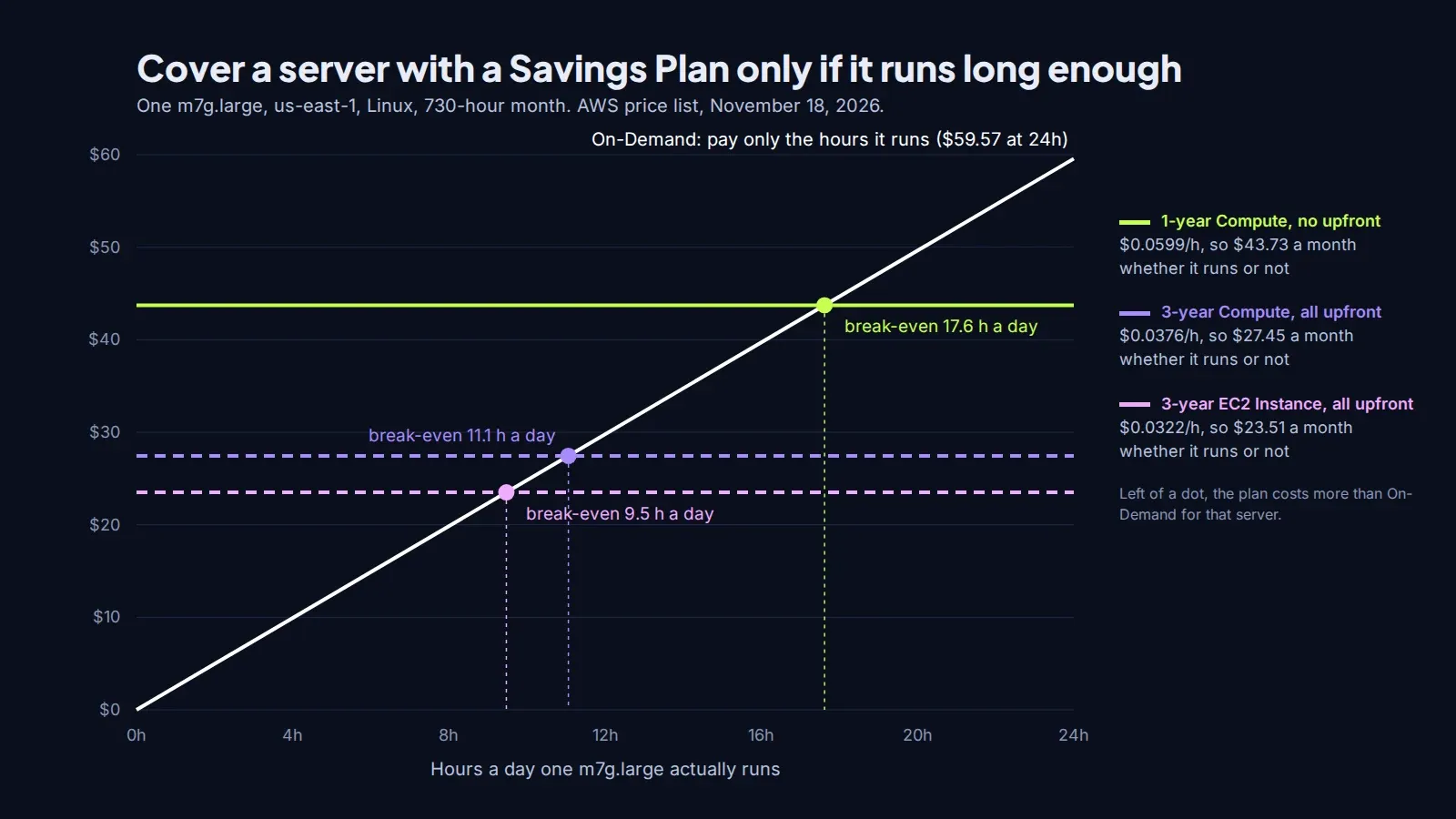
The Savings Plans calculator does this sum for your instance type, your quiet and busy counts, and all six term and payment options.
Compute or EC2 Instance?
The EC2 Instance plan is cheaper by a few points and much less forgiving. It covers one family in one region. If you move from m7g to m8g next spring (m8g.large is $0.08976 On-Demand, a different family), or move a service to Fargate, or to another region, the plan keeps billing and covers nothing. A Compute plan follows the usage across all of those.
For a startup whose setup may look different in a year, a one-year Compute plan with no upfront payment is the one we’d start with, sized to the overnight floor. You can buy more later, and plans stack. You can’t shrink one: the only way out is the return window, for plans of $100 an hour or less bought in the last 7 days and in the same calendar month.
Before you buy one
Look at the hourly usage, not the monthly total. AWS Billing and Cost Management makes purchase recommendations from your past On-Demand usage, and the Purchase Analyzer lets you try other amounts. Both are useful and both assume the last 7, 30 or 60 days look like the next year.
And fix the waste first. A Savings Plan bought for 12 oversized instances locks in the oversizing at a discount. Rightsize, turn off the idle staging environment, move the Graviton-friendly services to Graviton (an m7g.large is 19% cheaper than an m7i.large On-Demand), then commit to what’s left. That order is how we work when we reduce an AWS bill: $0 up front, then 50% of the verified monthly saving for 6 months, and nothing if nothing is saved. If you’d like a second opinion on a plan before you sign, send the bill to our free cloud cost audit. It costs $0 and a person reads it.
Want us to look at your bill?
No upfront fee: for six months you pay half of what we save you each month, then you keep all of it. Nothing saved, nothing owed.
Also here: Free cloud cost audit ($0) · Cloud cost optimization services: $0 up front · Reduce your startup's AWS bill · FinOps for startups: $0 audit · Pricing: paid only from verified savings · Move from AWS to a European cloud