
cloudfront pricing · aws · cdn
CloudFront Pricing: When the $15 Plan Beats Pay-As-You-Go
By Aakash Verma ·
How much does CloudFront cost? Under 1 TB and 10 million requests a month, nothing: that’s the always-free tier on pay-as-you-go. Past that, US and European traffic costs $0.085 per GB up to 10 TB, plus about a cent per 10,000 HTTPS requests. Or you can skip the meter and pay a flat $15 a month (Pro, 50 TB and 10 million requests) or $200 (Business, 50 TB and 125 million). Prices below are from AWS’s CloudFront pricing page and the pay-as-you-go page, checked November 18, 2026.
The flat-rate plans are about a year old now, and a distribution set up before them stays on pay-as-you-go until someone switches it. For a lot of sites that’s the wrong default. For some it’s right. The difference is mostly about three numbers: terabytes, requests, and whether you run AWS WAF.
Pay-as-you-go, line by line
Data transfer out to the internet, United States, Mexico and Canada (Europe, Israel and Turkiye are the same):
| Monthly volume | Price per GB |
|---|---|
| First 1 TB | $0 |
| Next 9 TB | $0.085 |
| Next 40 TB | $0.080 |
| Next 100 TB | $0.060 |
| Next 350 TB | $0.040 |
Requests: $0.0100 per 10,000 HTTPS and $0.0075 per 10,000 HTTP in North America; Europe is $0.0120 and $0.0090. The first 10 million each month are free. CloudFront Functions are $0.10 per million after 2 million free, Lambda@Edge has no free tier, invalidations are free for the first 1,000 paths a month, and data CloudFront pulls from an S3 origin costs nothing.
Then there’s the line people forget is part of the same decision: AWS WAF. On pay-as-you-go it’s $5 a month per web ACL, $1 per rule, and $0.60 per million requests it inspects. A modest web ACL with 10 rules is $15 a month before any traffic. Bot Control and Fraud Control bill on top of that; we priced those in AWS WAF pricing.
The flat-rate plans
| Plan | Price a month | Requests | Data transfer | S3 storage credit |
|---|---|---|---|---|
| Free | $0 | 1 million | 100 GB | 5 GB |
| Pro | $15 | 10 million | 50 TB | 50 GB |
| Business | $200 | 125 million | 50 TB | 1 TB |
| Premium | $1,000 | 500 million | 50 TB | 5 TB |
Each plan covers one distribution and includes WAF, DDoS protection, a Route 53 hosted zone, CloudWatch Logs ingestion for the access logs, and the TLS certificate. Premium can be raised in steps up to 600 TB and 6 billion requests for $10,000.
The part that surprised me reading the flat-rate plan docs: the allowances aren’t hard limits and there’s no overage charge at all. Your first spike up to 3x the allowance in a month is left alone. If you stay well over for two or three months, AWS may serve you from fewer or more distant edge locations until you upgrade. So the risk on a plan is slower delivery, not a surprise bill. Requests blocked by WAF don’t count toward the allowance either.
Four months, priced
All hypothetical, US traffic, every request over HTTPS. Our CloudFront pricing calculator does the same maths with your numbers.
A small SaaS marketing site: 300 GB, 4 million requests, no WAF. Pay-as-you-go is $0, inside the free tier. The Free plan wouldn’t fit (100 GB), and Pro is $15 for nothing you need. Stay on pay-as-you-go.
The same app a year later: 2 TB, 8 million requests, a web ACL with 5 rules. Pay-as-you-go is $87.04 of transfer (the second terabyte, 1,024 GB at $0.085), $0 of requests, and $14.80 of WAF. That’s $101.84 against Pro’s $15. That’s the case to look for first, because the switch saves about $1,040 a year and changes nothing about how the site is served.
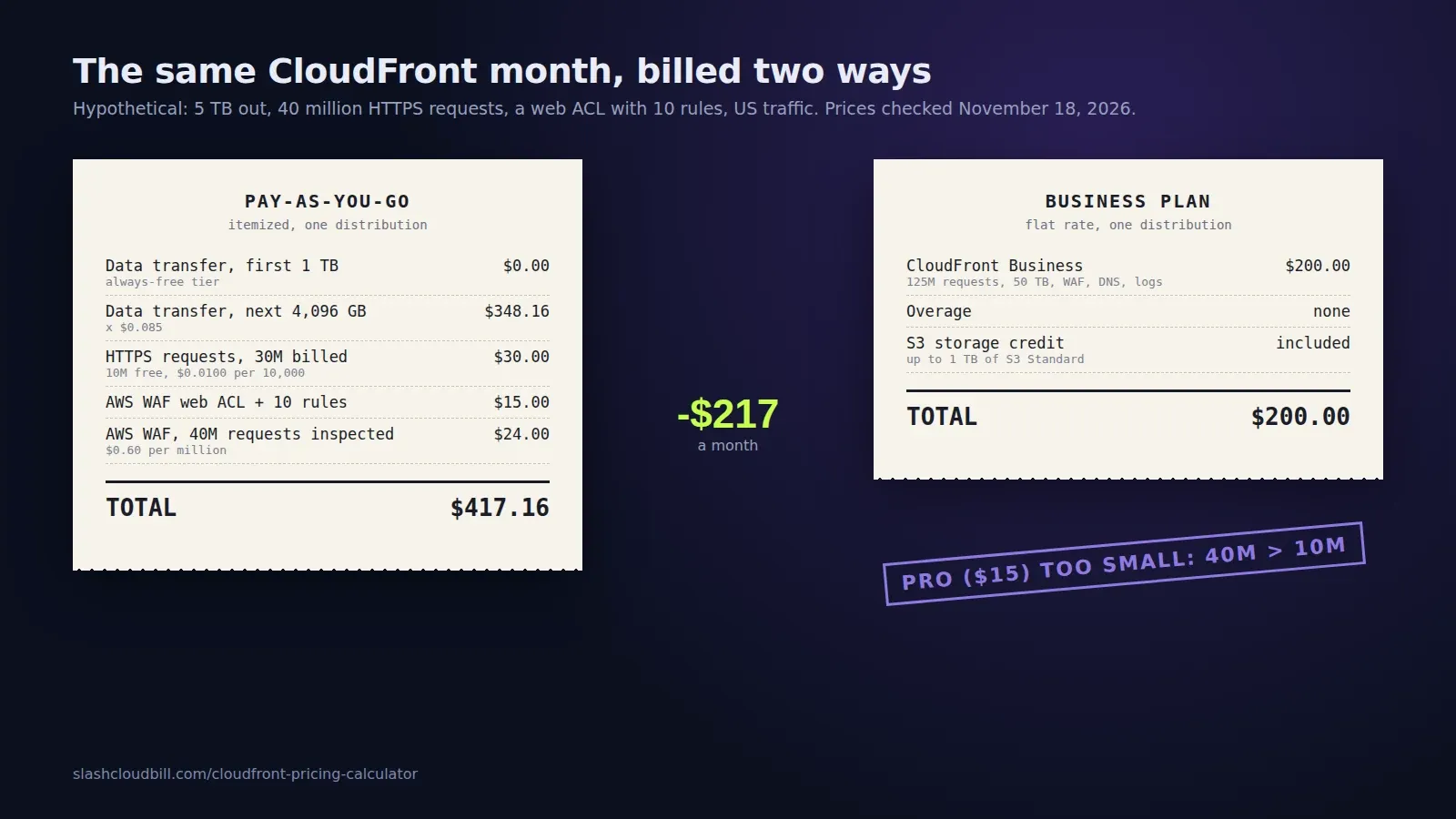
A busier product: 5 TB, 40 million requests, 10 WAF rules. Pay-as-you-go comes to $348.16 transfer, $30.00 requests and $39.00 WAF, $417.16 in total. Pro doesn’t fit any more because of requests, not bytes. Business at $200 does.
An image-heavy app serving lots of small files: 800 GB and 150 million requests. Pay-as-you-go is $0 transfer and $140 of requests with no WAF. Business doesn’t fit (125 million), and Premium’s $1,000 is seven times the meter. Pay-as-you-go wins clearly, unless you can cut the request count. Usually you can: long Cache-Control max-age on hashed assets and fewer, larger image variants.
When to stay on pay-as-you-go anyway
Some features don’t work on the plans at all. Real-time access logs, continuous deployment with staging distributions, Anycast static IPs, multi-tenant distributions, and WAF rule groups, partner rules, Targeted Bots and the account fraud protections all mean pay-as-you-go for that distribution. Also, a plan is per distribution, so five small distributions on Pro are $75. If you’ve got one per microsite, merging them behind one distribution with several origins is often the first saving.
And Lambda@Edge is billed on pay-as-you-go even inside a plan, so a heavy Lambda@Edge function doesn’t get cheaper by switching.
Where this shows up on the bill
On the AWS invoice it’s under CloudFront, split into DataTransfer-Out-Bytes and Requests-Tier1 or Requests-Tier2-HTTPS lines per region, with WAF as its own service. If the CloudFront and WAF lines together are more than $15 and your requests sit under 10 million, you’re very likely overpaying. If you want someone to check, our free cloud cost audit costs $0 and we read the bill line by line. When the savings are bigger than one plan switch, our AWS cost reduction is $0 up front and 50% of the verified monthly saving for 6 months, nothing if nothing is saved.
If the site behind the CDN is a Lovable app you’re moving onto your own AWS account, Lovable 2 Live has a fixed-price job for moving a Lovable app to your own server.
Want us to look at your bill?
No upfront fee: for six months you pay half of what we save you each month, then you keep all of it. Nothing saved, nothing owed.
Also here: Free cloud cost audit ($0) · Cloud cost optimization services: $0 up front · Reduce your startup's AWS bill · FinOps for startups: $0 audit · Pricing: paid only from verified savings · Move from AWS to a European cloud