
aws · ebs · pricing
EBS Pricing: gp3 Is $0.08 a GB, gp2 Still Costs $0.10
By Aakash Verma ·
Amazon EBS charges you for the gigabytes you provision, every hour the volume exists, whether anything is written to it or not. In US East a gp3 volume costs $0.08 per GB-month and the older gp2 costs $0.10, so the same 1,000 GiB disk is $80 or $100 a month depending on one setting that most people never look at again.
Prices here are from the Amazon EBS pricing page and the AWS Price List for US East (N. Virginia), published October 29, 2026, checked October 31. In Frankfurt, volume storage costs about 19% more.
The price list, short version
| Line | US East price |
|---|---|
| gp3 storage | $0.08 per GB-month, includes 3,000 IOPS and 125 MiB/s |
| gp3 extra IOPS | $0.005 per IOPS-month above 3,000 |
| gp3 extra throughput | $0.04 per MiB/s-month above 125 |
| gp2 storage | $0.10 per GB-month, IOPS set by size |
| io2 / io1 storage | $0.125 per GB-month |
| io2 / io1 IOPS | $0.065 per IOPS-month (io2 drops to $0.0455 above 32,000) |
| st1 / sc1 (HDD) | $0.045 / $0.015 per GB-month |
| Snapshots, standard | $0.05 per GB-month stored |
| Snapshots, archive | $0.0125 per GB-month, $0.03 per GB to restore |
That’s it. Two of those rows cause almost every EBS line we look at.
gp2 makes you buy size to get speed
On gp2, performance comes from size. AWS’s General Purpose SSD docs give it as 3 IOPS per GiB, minimum 100, maximum 16,000. Want 3,000 IOPS without bursting? You need a 1,000 GiB volume. So people created 1,000 GiB volumes for databases holding 40 GB, and the bill shows $100 a month for a disk that’s 96% empty.
gp3 separates the two. Every gp3 volume gets 3,000 IOPS and 125 MiB/s included, and you add more IOPS (up to 80,000) and throughput (up to 2,000 MiB/s) for a fee. That 40 GB database fits on a 100 GiB gp3 volume with the same 3,000 IOPS for $8 a month.
One catch people miss when they switch: a gp2 volume of 334 GiB or more gets 250 MiB/s of throughput, and gp3 includes only 125. If the volume actually moves that much data, add 125 MiB/s on gp3 for $5 a month. Still cheaper. Just don’t quietly halve the throughput of a busy database and blame the migration later.
The switch itself is an Elastic Volumes modification: change the type in place, no detach, no downtime. AWS limits how often you can modify the same volume, so get the IOPS right the first time. Changing the size doesn’t make the volume smaller, though. Shrinking means a new volume and copying the data, which is real work on a database.
A worked example
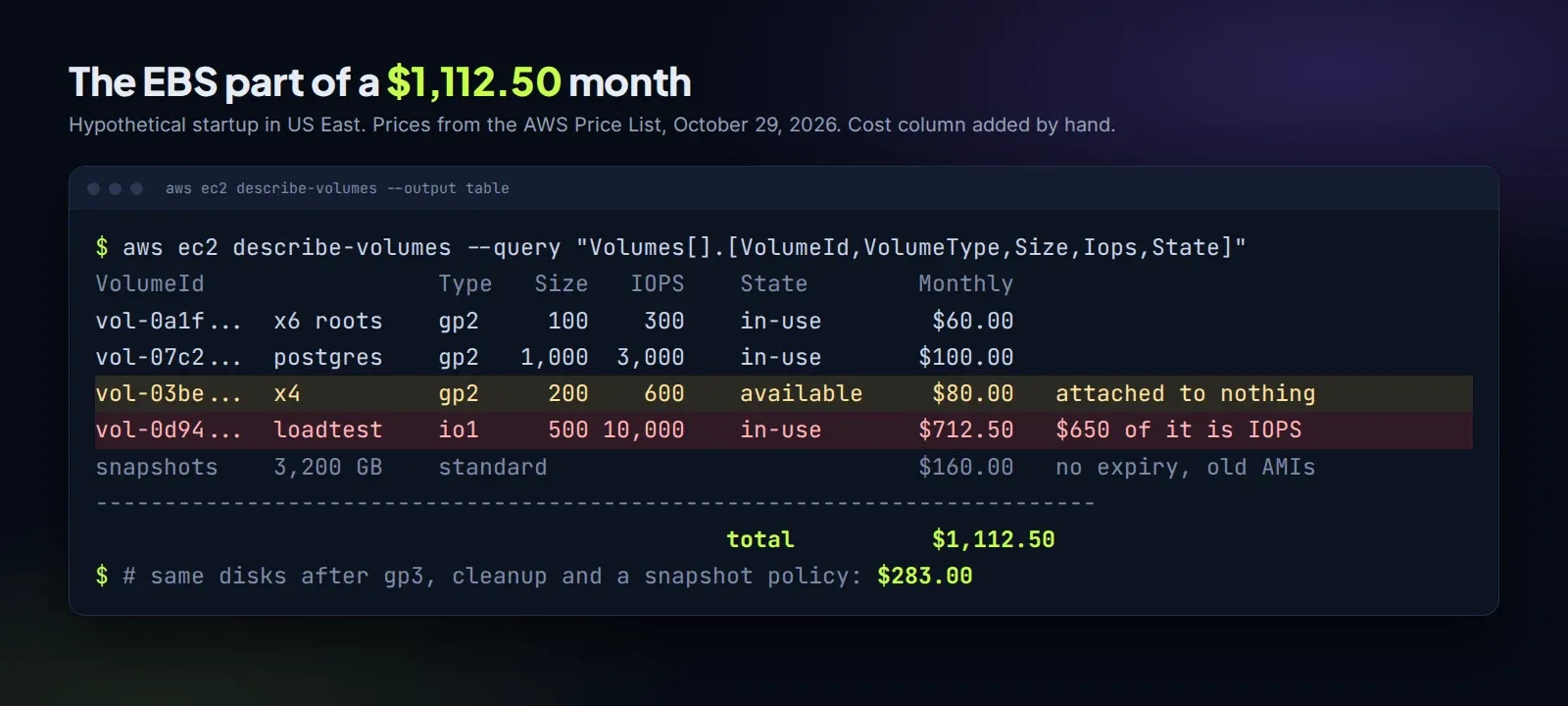
A hypothetical startup in US East, the kind of setup we see a lot:
- 6 app servers, each with a 100 GiB gp2 root volume: $60.00
- one 1,000 GiB gp2 volume for a self-managed Postgres: $100.00
- 4 old 200 GiB gp2 volumes in “available” state, attached to nothing, left from instances someone terminated: $80.00
- one 500 GiB io1 volume with 10,000 provisioned IOPS, set up for a load test last year and never changed: $62.50 storage plus $650.00 IOPS
- 3,200 GB of snapshots from daily backups with no expiry and old AMIs: $160.00
That’s $1,112.50 a month for disks. The io1 IOPS line alone is 58% of it.
What we’d change, in order of money:
- io1 to gp3 with the same 10,000 IOPS and 250 MiB/s: $40 storage + 7,000 extra IOPS at $0.005 ($35) + 125 extra MiB/s ($5) = $80. Before that, check the volume’s real peak IOPS in CloudWatch. A load-test volume often needs 3,000 and nothing more.
- Root volumes to gp3: $48.
- The Postgres volume to gp3, keeping 3,000 IOPS and adding throughput back to 250 MiB/s: $85. Shrinking it to 200 GiB would save another $64, but that’s a migration, so it waits.
- The four orphaned volumes: snapshot them, archive the snapshots, delete the volumes. Archived snapshots are full copies, so 800 GB at $0.0125 is $10 a month, kept as long as you’re nervous.
- Snapshots: a Data Lifecycle Manager policy keeping 14 dailies and 6 monthlies, plus deregistering old AMIs and deleting their snapshots. Say 1,200 GB remains: $60.
New total: $283.00 a month, from $1,112.50. Nothing in production slowed down, and most of it is setting changes.
Snapshots: where old money sits
Standard snapshots are incremental: each one stores only the blocks that changed since the previous one, so a daily snapshot of a quiet volume is cheap. The cost builds up in what nobody deletes. Deregistering an AMI does not delete the snapshots behind it. Deleting an EC2 instance does not delete its snapshots either. And snapshots sitting in the Recycle Bin are billed at the normal rate until their retention runs out.
The archive tier looks like a 75% discount, and for the right snapshot it is. The snapshot archive docs explain the part that matters: archiving converts the incremental snapshot into a full one. Archive a daily snapshot of a 500 GB volume where only 5 GB changed, and you go from paying for 5 GB at $0.05 to 500 GB at $0.0125, for at least 90 days. That’s $6.25 instead of $0.25. Archive end-of-project and yearly snapshots, never the daily chain.
Finding these lines on your own bill
In Cost Explorer, filter to EC2 and group by usage type. EBS shows up as EBS:VolumeUsage.gp2, EBS:VolumeUsage.gp3, EBS:VolumeP-IOPS.piops, EBS:SnapshotUsage and friends. Then list unattached volumes with aws ec2 describe-volumes --filters Name=status,Values=available. If that command returns anything at all, you’ve found money.
To price your own volumes, the EBS pricing calculator does gp3, gp2, io2, io1 and HDD volumes, snapshots and the archive tier, and shows any gp2 setup on gp3 with the same performance. AWS also publishes its own gp2 to gp3 savings spreadsheet if you’d rather do it in Excel.
If EBS is one line on a bigger AWS bill that keeps growing, our free cloud cost audit costs $0 and reads the whole bill. When it’s worth doing the work, we reduce startup AWS bills for $0 up front and 50% of the verified monthly saving for 6 months, nothing if nothing is saved. The other quiet line on most of these bills is the NAT gateway.
Want us to look at your bill?
No upfront fee: for six months you pay half of what we save you each month, then you keep all of it. Nothing saved, nothing owed.
Also here: Free cloud cost audit ($0) · Cloud cost optimization services: $0 up front · Reduce your startup's AWS bill · Pricing: paid only from verified savings · Move from AWS to a European cloud