
neon · postgres · pricing
Neon Pricing: You Pay for the Hours Your Database Is Awake
By Aakash Verma ·
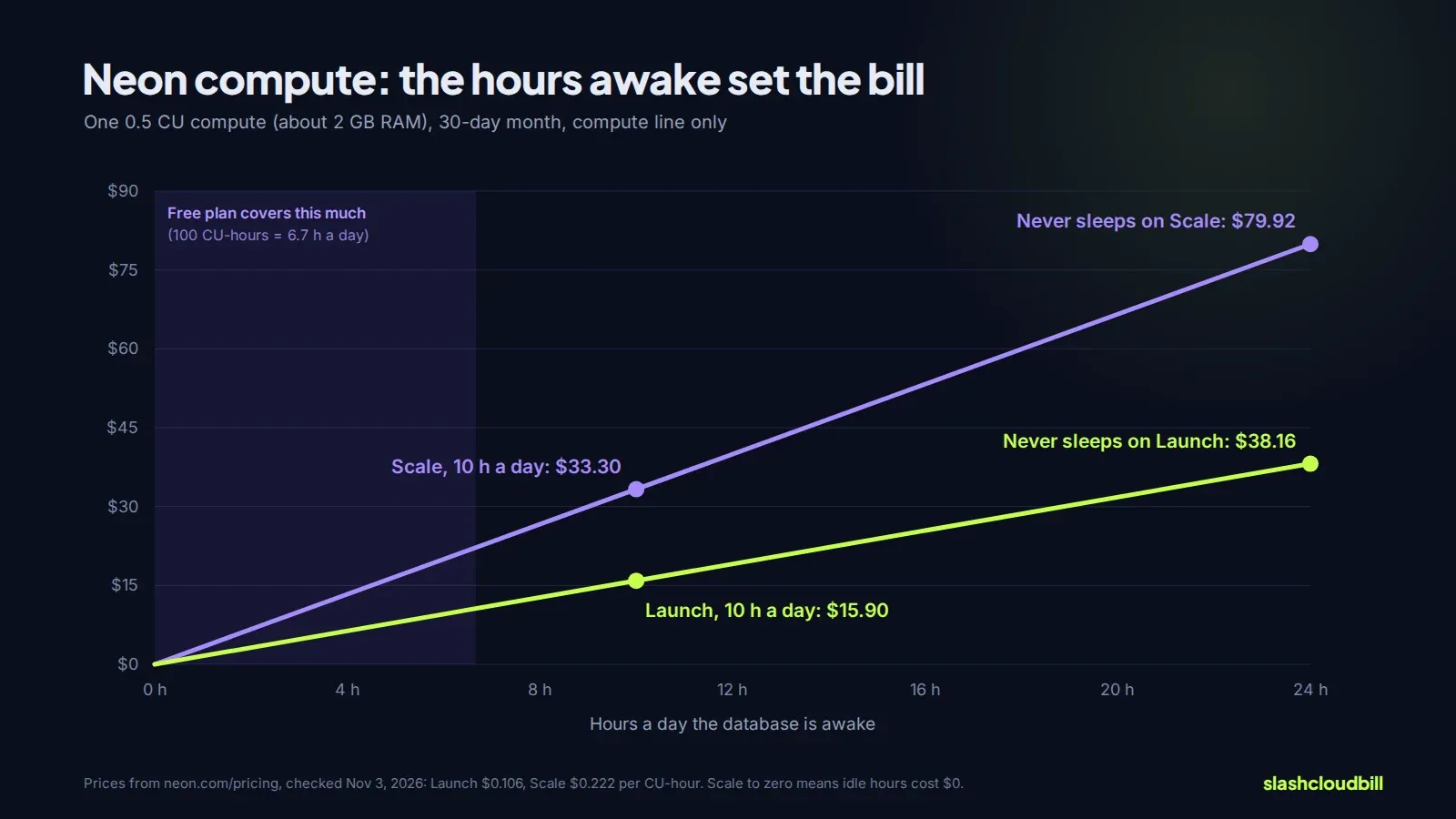
Neon pricing has no monthly fee on its paid plans. You pay for compute by the CU-hour while the database is running, $0.106 on Launch and $0.222 on Scale, plus $0.35 per GB-month of storage. A small app database that runs 10 hours a day at 0.5 CU comes to about $20 a month on Launch. The same database left running all month costs about $43, because the compute line more than doubles.
Every number here is from Neon’s pricing page, checked November 3, 2026 (Neon last updated it October 31). One CU is about 4 GB of RAM, and the smallest compute is 0.25 CU.
The three plans
| Free | Launch | Scale | |
|---|---|---|---|
| Monthly minimum | $0 | none, usage only | none, usage only |
| Compute | 100 CU-hours per project | $0.106 per CU-hour | $0.222 per CU-hour |
| Largest compute | 2 CU (8 GB RAM) | 16 CU autoscaling | 16 CU autoscaling, or fixed up to 56 CU |
| Storage | 1 GB per project, 20 GB in total | $0.35 per GB-month | $0.35 per GB-month |
| Restore window | 6 hours | up to 7 days | up to 30 days |
| Branches included | 10 | 10, then $1.50 each a month | 25, then $1.50 each a month |
| Data out included | 5 GB per project | 500 GB per project, then $0.10 per GB | 500 GB per project, then $0.10 per GB |
| Scale to zero | after 5 minutes, always on | after 5 minutes, can be turned off | 1 minute to never |
Scale also adds private networking ($0.01 per GB), compliance features and the higher support tiers. For most startups the choice comes down to the restore window and whether you need more than 10 branches.
How a Neon bill adds up
Compute is the line that moves. It’s the compute size times the hours it’s awake: 0.5 CU for 150 hours is 75 CU-hours, 1 CU for 150 hours is 150. Autoscaling raises the size during a busy query and brings it back down, and you pay for whatever size it was during each hour.
Storage has three parts. The main (root) branch is billed on its full size. Child branches start at $0 because they share the parent’s data, and grow only with what you write on them. And the restore window keeps a history of changes, billed at $0.20 per GB-month as “instant restore” on root branches. Scheduled snapshots, if you turn them on, are $0.09 per GB-month.
Worked through for a small SaaS on Launch:
- Compute: 0.5 CU, awake 10 hours a day for 30 days = 150 CU-hours × $0.106 = $15.90
- Storage: 10 GB × $0.35 = $3.50
- Restore history: 3 GB × $0.20 = $0.60
- Data out: 20 GB, inside the 500 GB included = $0
- Total: $20.00 a month. On Scale, the compute line alone is $33.30.
Where the bill grows
The database never sleeps. Scale to zero is the reason Neon can be cheap, and lots of apps quietly defeat it. An uptime monitor that queries the database every minute, a cron job every five, a connection pooler that holds connections open, an admin dashboard left open in a tab: each keeps the compute awake. A 0.5 CU compute that never stops uses 365 CU-hours a month, $38.69 on Launch and $81.03 on Scale. Point health checks at an endpoint that doesn’t touch the database, and batch cron jobs together.
Autoscaling with a high ceiling. If the maximum is 4 CU and a slow query or a report keeps the compute there, every hour costs eight times an hour at 0.5 CU. Set the ceiling to what the app needs, and fix the query that pushes it up. Neon’s autoscaling docs show how the range works.
Branches that nobody deletes. Preview branches per pull request are one of Neon’s best features. Past the included 10 or 25, each one is $1.50 a month, and a branch that someone wrote test data into also grows its own storage. Give them an expiry.
A long restore window on a busy database. The 30-day window on Scale keeps 30 days of changes. On a database that rewrites a lot of rows, the history can end up bigger than the data.
Is the Free plan enough?
Free gives each project 100 CU-hours a month. At 0.25 CU that’s 400 hours awake, a bit over 16 days. So a side project that sleeps most of the day fits, but a database that’s always on doesn’t: 0.25 CU for a full month is about 182 CU-hours. When a Free project runs out of CU-hours or egress, Neon suspends the compute until the next month. It doesn’t delete data, but the app is down. Anything with paying users belongs on Launch.
Neon next to the alternatives
At the same size, a database that’s always on is often cheaper as a fixed instance than as serverless compute. Our managed Postgres comparison prices one database on Supabase, Fly.io, Render, Railway and RDS, and the Supabase cost guide covers the plan most Neon users compare against. If your traffic is spiky and the database sleeps most of the night, Neon usually wins. If it’s busy all day, run the numbers both ways.
To price your own setup, the Neon pricing calculator takes the compute size, hours awake, storage, branches and restore history, and says whether the Free plan would cover it. For comparisons with real workloads, Neon’s plans docs explain how each meter is measured.
If Neon is one line on a bigger bill, the free cloud cost audit is $0: send the bill lines, no logins, and a person replies by email. Or we do the work through our cloud cost optimization services: $0 up front, 50% of the verified monthly saving for 6 months, then 0%, and nothing if nothing is saved.
Want us to look at your bill?
No upfront fee: for six months you pay half of what we save you each month, then you keep all of it. Nothing saved, nothing owed.
Also here: Free cloud cost audit ($0) · Cloud cost optimization services: $0 up front · Reduce your startup's AWS bill · Pricing: paid only from verified savings · Move from AWS to a European cloud