
netlify · pricing · hosting
Netlify Pricing: What the Credits Actually Pay For
By Aakash Verma ·
Netlify pricing changed shape in September 2025. Accounts created since September 4, 2025 don’t get a bandwidth allowance and a build-minute allowance any more. They get a monthly pot of credits, and almost everything the account does spends from it. Older accounts are still on what Netlify now calls legacy plans, and they can switch to credits, but Netlify’s own docs say the switch can’t be undone.
This post is about the credit plans, because that’s what anyone signing up today is on. Prices are from netlify.com/pricing and the “how credits work” docs, checked October 16, 2026.
The plans
| Plan | Price | Credits a month | When they run out |
|---|---|---|---|
| Free | $0 | 300 | every site on the account is paused |
| Personal | $9 | 1,000 | buy 500 more for $5 |
| Pro | $20 | 3,000, unlimited team seats | buy 1,500 more for $10 |
Pro is flat, not per seat, which is a real change from the old per-member Pro. A team of six pays $20 too.
What spends credits
From How credits work:
- a successful production deploy: 15 credits
- bandwidth: 20 credits per GB
- web requests: 2 credits per 10,000
- compute (functions, preview servers, database): 10 credits per GB-hour
- AI inference through Netlify: 180 credits per $1 of model cost
Deploy previews, branch deploys, failed deploys, rollbacks and form submissions cost nothing.
Read that list again with a normal team in mind and the surprise is the first line. Bandwidth and requests are what people expect to pay for. Deploys feel free, because on the old plans they basically were.
A worked example
Take a hypothetical marketing site with a blog, edited through a headless CMS, about 30,000 visits a month.
- 25 GB of bandwidth: 500 credits
- 600,000 web requests (pages, assets, a few API calls): 120 credits
- 5 GB-hours of function compute for the contact form backend and a search endpoint: 50 credits
That’s 670 credits, comfortably inside Personal’s 1,000. Now add the deploys. If the team merges twice a day, about 40 production deploys a month is 600 credits, and the month is at 1,270. Personal costs $9 plus one $5 pack, so $14. Pro would be $20 with room to spare.
Here’s where it goes wrong: many headless CMS setups trigger a production build on every save. An editor fixing typos in a long post can save 15 times in an hour. Fifteen saves a day across a month is around 450 deploys, which is 6,750 credits from deploys alone. That account is now on Pro buying two or three packs a month, $40 to $50, for a site whose real traffic costs 670 credits.
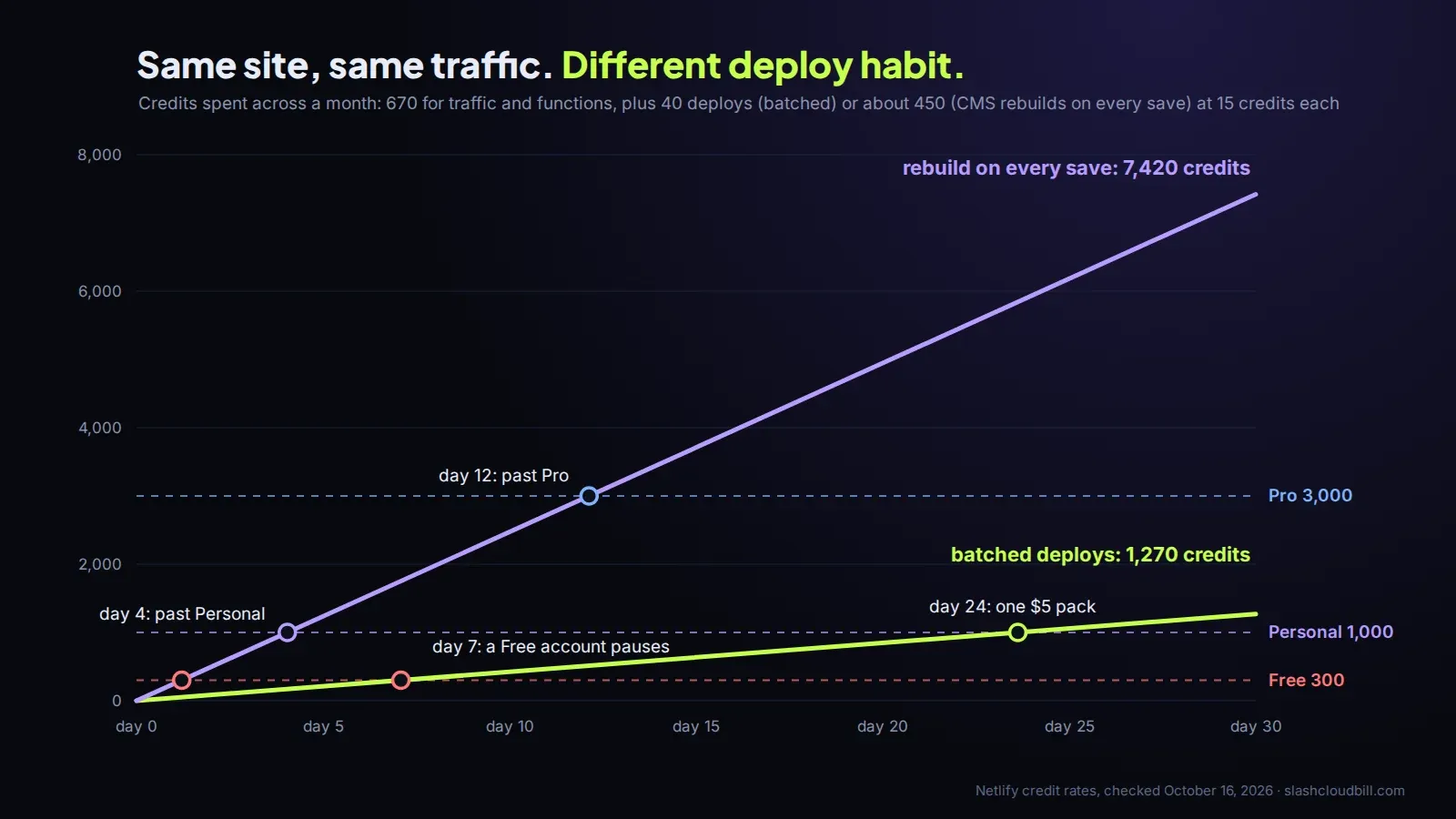
The fix is configuration, not a plan change: point the CMS webhook at a build hook that runs on a schedule or on “publish” only, and review edits on deploy previews, which are free.
The pause is the real cost of Free
Free has 300 credits and no way to buy more. When the account reaches zero, Netlify pauses every site on it and visitors see “Site not available” until the next month. 300 credits is 20 deploys, or 15 GB of bandwidth, or some mix of the two. One link on a busy forum to a page with large images can do it in an afternoon.
That’s fine for a hobby project. It is not fine for a portfolio you’re sending to clients or a landing page for something you sell. If the site matters, Personal at $9 is the cheapest plan that can’t be switched off by a traffic spike, because it can top up.
Bandwidth: check the images first
At 20 credits per GB, and $10 for 1,500 credits on Pro, a GB costs about 13 cents. That’s more than most CDNs charge, and images are almost always most of it. Serve them through Netlify Image CDN or resize them at build time, and the bandwidth line usually halves without anyone noticing a difference.
Moving a frontend here from an app builder
A lot of people land on Netlify because they’re moving a site off an AI app builder: the frontend is a static build that drops onto Netlify in an afternoon. The backend is the part that doesn’t move with it. If that’s your situation with a Lovable app, Lovable 2 Live wrote up which way to go depending on why you’re leaving, and the hosting side is the easy half.
To see your own numbers, put a month of deploys and traffic into the Netlify pricing calculator. If you’d rather we read your usage page and tell you what’s spending the credits, that’s what the free bill review below is for.
Want us to look at your bill?
No upfront fee: for six months you pay half of what we save you each month, then you keep all of it. Nothing saved, nothing owed.
Also here: Free cloud cost audit ($0) · Cloud cost optimization services: $0 up front · Reduce your startup's AWS bill · Pricing: paid only from verified savings · Move from AWS to a European cloud