
netlify · vercel · pricing
Netlify vs Vercel Pricing: Seats or Bandwidth?
By Aakash Verma ·
Netlify vs Vercel used to be a question about features. In late 2026 it’s mostly a question about two billing models. Vercel Pro charges $20 per developer seat and includes 1 TB of transfer. Netlify Pro charges a flat $20 for unlimited members, then bills nearly everything, bandwidth and production deploys included, out of 3,000 monthly credits. So the cheaper one depends on two numbers: how many people deploy, and how many gigabytes leave your site.
Prices from Vercel’s pricing page and Netlify’s pricing page, both checked on October 28, 2026. Netlify’s credit rates are the same ones we used for our Netlify pricing calculator (checked October 16; unchanged today).
The two price lists, side by side
Vercel Pro: $20 a month per developer seat, viewers free. Each month includes 1 TB of Fast Data Transfer, 10 million CDN requests and a $20 usage credit. Past that: from $0.15 per GB of transfer, $2 per million requests, $0.60 per million function invocations, $0.128 per hour of Active CPU, $0.0106 per GB-hour of provisioned memory, and build minutes from $0.007 (Basic machine) or $0.014 (Standard).
Netlify Pro: $20 a month flat, unlimited members, 3,000 credits. A production deploy costs 15 credits. Bandwidth is 20 credits per GB, web requests 2 credits per 10,000, compute 10 credits per GB-hour. Deploy previews and branch deploys cost nothing. When you run out, auto recharge buys 1,500 credits for $10.
Turn Netlify’s credits into dollars at that top-up rate and bandwidth comes to about $0.13 per GB, a bit cheaper than Vercel’s $0.15. The difference is where it starts. Vercel’s first terabyte is in the plan. On Netlify, the first gigabyte already eats credits.
One app, priced 20 ways
A hypothetical Next.js app: 3 million requests a month, about 100 production deploys (a few merges a day), light serverless functions (1 million invocations, around 10 hours of Active CPU, 20 GB-hours of memory) and 2-minute builds on Vercel’s Standard machine. We kept all of that fixed and changed two things: monthly transfer and the number of developers who deploy.
On Vercel the function and build usage comes to about $4.89 a month, which the $20 credit covers. We counted that credit once per team, not per seat, to stay on the safe side.
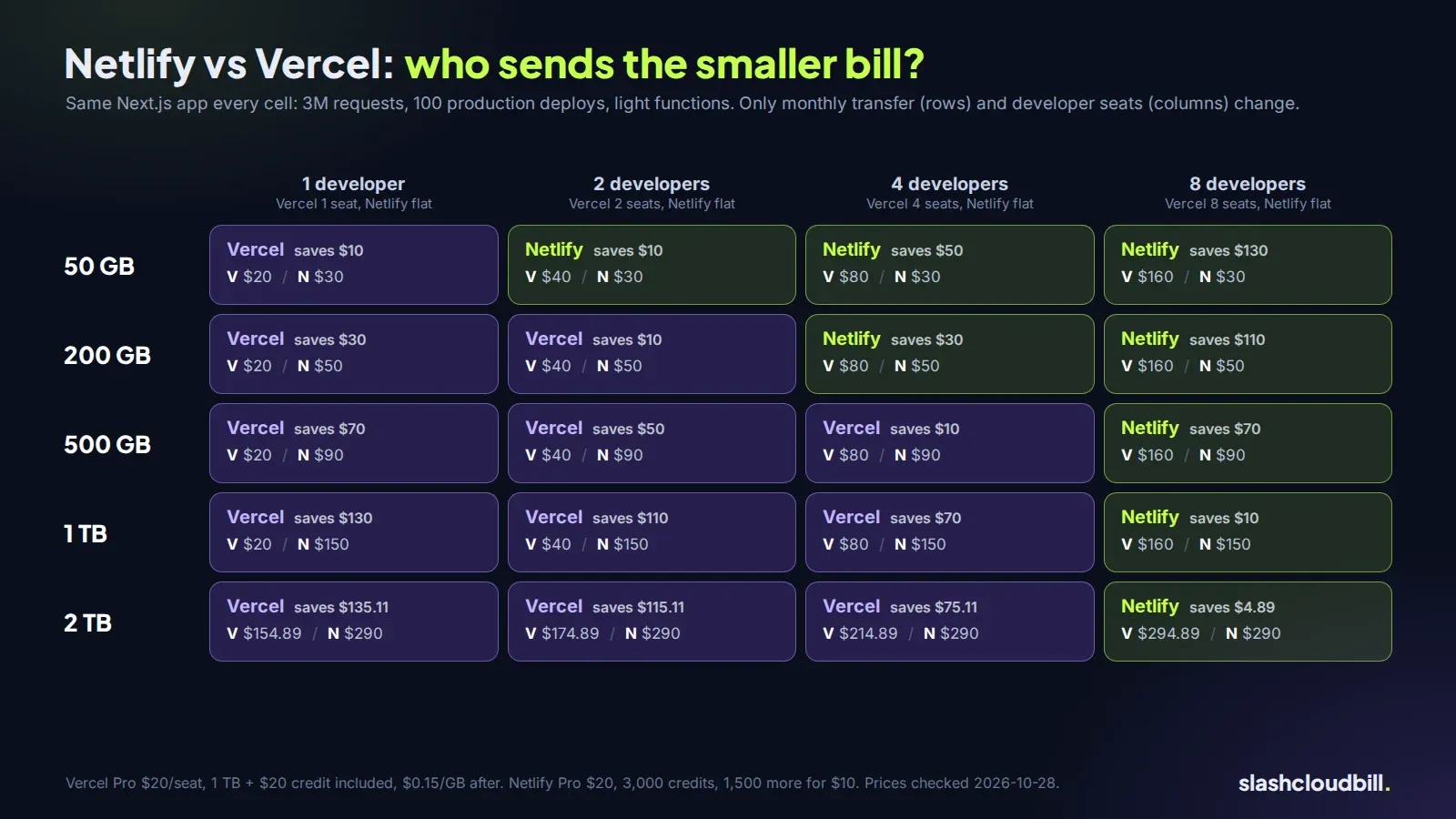
Netlify doesn’t care about team size, so its bill only moves with traffic: $30 at 50 GB, $50 at 200 GB, $90 at 500 GB, $150 at 1 TB and $290 at 2 TB. Vercel is $20 a seat up to 1 TB, so $20 solo, $40 for two, $80 for four, $160 for eight. At 2 TB it adds 1,000 GB of overage at $0.15, about $135 more after the credit, for $154.89 solo and $294.89 for eight.
So:
- Solo: Vercel, at every traffic level we tried. At 1 TB a single developer pays $20 on Vercel and $150 on Netlify.
- Two developers: Netlify only at 50 GB ($30 vs $40), Vercel from 200 GB on.
- Four developers: Netlify up to about 200 GB ($50 vs $80), Vercel from 500 GB on.
- Eight developers: Netlify at every level we tried, by less than $5 at 2 TB ($290 vs $294.89).
The line nobody looks at: deploys
Our hypothetical app’s 100 production deploys cost 1,500 Netlify credits, half of Pro’s monthly allowance, before a single visitor shows up. Teams that deploy every merge to main, plus a scheduled rebuild for a CMS, can burn through 3,000 credits on deploys alone. Previews are free, so the fix is cheap: batch merges into fewer production deploys, or move the scheduled rebuild to incremental updates. On Vercel, deployments are unlimited and only build minutes cost money.
What else changes the answer
Where your visitors are. Vercel’s $0.15 per GB is the starting rate. Transfer served from some regions costs more, per Vercel’s regional pricing page. If most of your traffic is outside North America and Europe, recheck the 2 TB row with those rates.
Heavy functions. Our app’s functions are light. An app that streams AI responses or does image work runs up Active CPU and memory hours on Vercel and compute credits on Netlify, and that can change the picture more than bandwidth does.
What happens at the limit. On Netlify’s credit plans, when an account runs out with no recharge, every site on it is paused until credits come back. Set auto recharge on Pro. On Vercel, turn on spend management so a traffic spike sends you an alert or pauses projects at a number you chose, rather than surprising you on the invoice.
Old Netlify accounts. Accounts created before September 4, 2025 can stay on the legacy plans, and switching to credits can’t be undone. Run your own numbers before you click it.
If your bill is on either platform and you’re not sure which line is growing, plug your real usage into the Netlify calculator, or send us the invoice for a free bill review and we’ll tell you what we’d change.
Want us to look at your bill?
No upfront fee: for six months you pay half of what we save you each month, then you keep all of it. Nothing saved, nothing owed.
Also here: Free cloud cost audit ($0) · Cloud cost optimization services: $0 up front · Reduce your startup's AWS bill · Pricing: paid only from verified savings · Move from AWS to a European cloud