
railway · pricing
Railway Pricing: What You Actually Pay For
By Aakash Verma ·
Railway pricing looks like the simplest bill in hosting. Hobby is $5 a month, Pro is $20, and you pay for what you use. Then the invoice arrives and it’s $43, and nothing on it says “this is the service that did it”.
The model really is simple. It’s just different from “rent a server”, and the differences decide what you pay. All prices here are from Railway’s plans and pricing docs and railway.com/pricing, checked on October 15, 2026.
The plan fee is a floor, not a fee
Railway charges a subscription, and the subscription counts toward your usage:
| Plan | Monthly fee | Usage it covers |
|---|---|---|
| Free | $0 | $1 of credit a month, 0.5 GB RAM per service |
| Hobby | $5 | $5 |
| Pro | $20 | $20 |
So on Hobby you pay $5 or your usage, whichever is higher. Railway’s own example: $3 of usage costs $5, $7 of usage costs $7. On Pro it’s $20 or your usage. That makes the plan choice less about price than people think. A project using $14 a month costs $14 on Hobby and $20 on Pro. Pro is for teams, higher limits (Hobby caps a service at 48 GB of RAM and 6 replicas) and longer image retention, not for saving money.
The four meters
Usage is metered per minute and has four parts:
- RAM: $10 per GB per month
- CPU: $20 per vCPU per month
- Volume storage: $0.15 per GB per month
- Egress: $0.05 per GB
Builds are free, which is genuinely nice: no build minutes to ration.
The important word is “use”. Railway bills the memory and CPU a service actually uses, minute by minute, not a size you picked. A Node API that idles at 0.02 vCPU costs about 40 cents a month in CPU. The same API holding 600 MB of memory costs $6 a month in RAM, every month, whether anyone calls it or not.
Here’s a hypothetical but very normal small SaaS: a web service averaging 0.5 GB and 0.1 vCPU, Postgres averaging 0.4 GB and 0.05 vCPU on a 5 GB volume, a Redis plus a worker at 0.2 GB together, and 50 GB of egress.
| Line | Usage | Cost |
|---|---|---|
| RAM | 1.1 GB | $11.00 |
| CPU | 0.17 vCPU | $3.40 |
| Volume | 5 GB | $0.75 |
| Egress | 50 GB | $2.50 |
| Total usage | $17.65 |
On Hobby that’s a $17.65 bill. On Pro, $20. RAM is almost two thirds of it, and that’s the pattern on nearly every Railway project: memory is the bill.
A memory leak is a billing leak
Because RAM is billed as it’s used, anything that makes a service hold more memory makes the bill grow, quietly. Nothing crashes. Railway’s per-service limits are generous, so a slow leak can climb for days before anything restarts it.
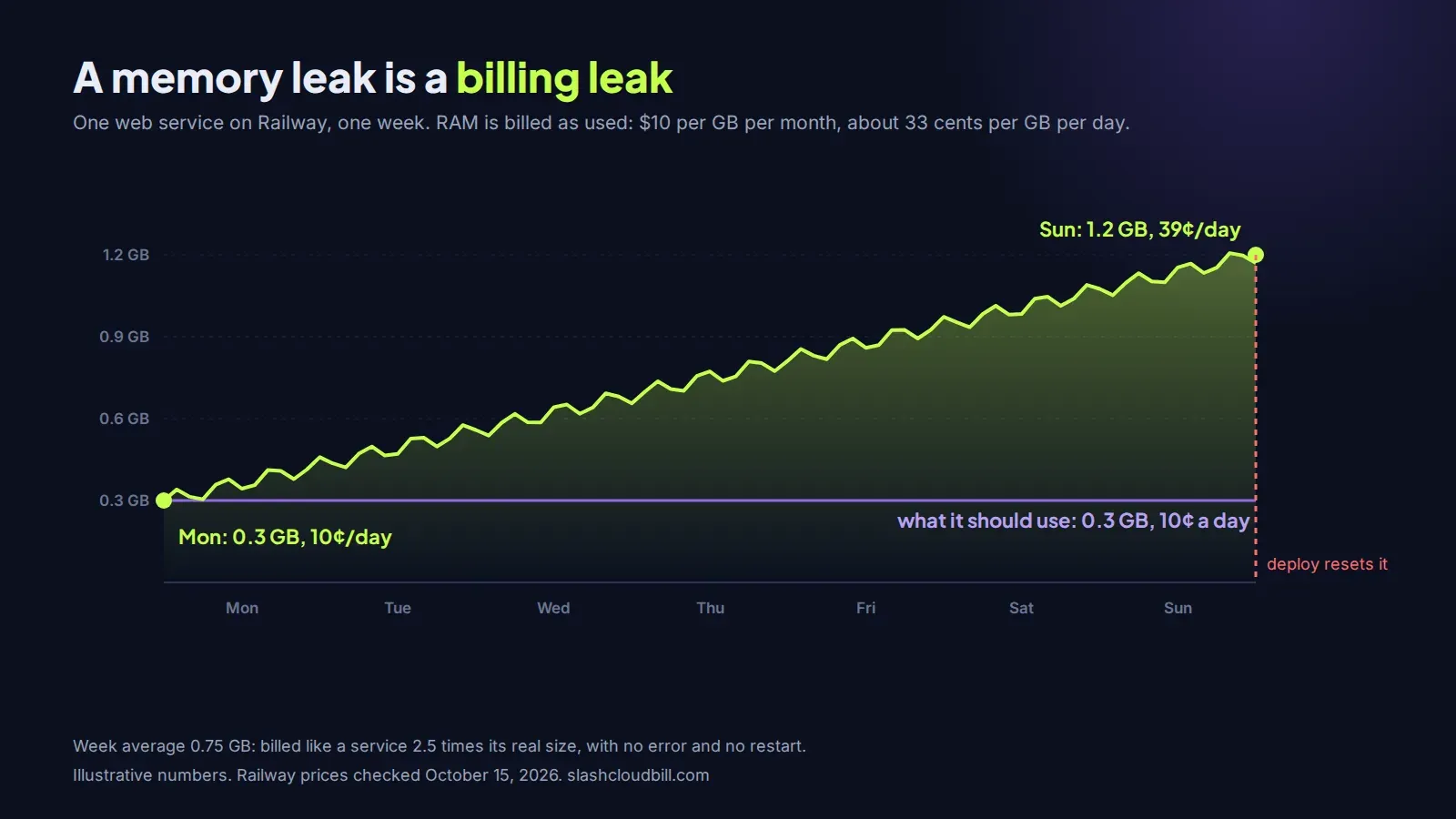
Run the numbers on that week. At 0.3 GB the service costs about 10 cents a day in RAM. At 1.2 GB it costs about 39 cents a day. Averaged over the week it’s billing like a 0.75 GB service, two and a half times what it should, and if you deploy often the reset hides it. The usual suspects are an in-memory cache with no size limit, a module-level array that only ever gets pushed to, and a worker that loads an entire export into memory to process it. The service’s Metrics tab shows memory over time; the invoice doesn’t.
Copies multiply everything
Each replica is billed on its own usage. Three replicas of a 0.5 GB service is 1.5 GB of RAM.
Environments are copies too. A staging environment with the same web service, database and worker, awake all day, is very nearly a second production bill, and for the example above it adds $14.40 in RAM and CPU. PR environments are the same thing in smaller pieces: each one is a full set of services for as long as it lives.
Sleeping services, and why yours don’t sleep
Railway’s Serverless setting (it used to be called App Sleeping) puts a service to sleep after 5 minutes without outbound traffic and wakes it on the next request. A sleeping service doesn’t use RAM or CPU, so for staging and internal tools it can cut those lines by most of the day.
The catch is in the word outbound. Railway counts any packet the service sends: an open database connection pool, NTP, Next.js telemetry, a health check to another service. A typical web app with a Postgres pool open never stops sending, so it never sleeps, even with the setting on. The docs also note the first request after a nap can return a 502 while the service starts, which is fine for staging and not fine for a checkout page.
If you want staging to sleep, close idle pool connections (set a short idle timeout), turn off framework telemetry with an environment variable, and check the service’s metrics the next morning to see if it actually went to sleep.
Set a hard limit before you need one
Railway has usage limits on every plan: an email alert at an amount you choose, and an optional hard limit. Take the hard limit seriously. When usage reaches it, Railway takes all your workloads offline until the next cycle. That’s the right setting for a side project and the wrong one for a product with paying users, where an email alert at 1.5x your normal bill is enough.
Where we’d look first
On a Railway bill that feels too high, we’d check memory per service over a week, then environments and replicas nobody needs at full size, then whether “sleeping” services ever actually slept. Egress and volumes are rarely the problem.
Put your own services into our Railway pricing calculator to see which line is yours. If the answer is that Railway isn’t the right home any more, the same app on a European server is covered in moving to the EU. We also do the trimming as a service: a free cloud cost audit of the bill, then cloud cost optimization at $0 up front, paid from the saving.
Want us to look at your bill?
No upfront fee: for six months you pay half of what we save you each month, then you keep all of it. Nothing saved, nothing owed.
Also here: Free cloud cost audit ($0) · Cloud cost optimization services: $0 up front · Reduce your startup's AWS bill · Pricing: paid only from verified savings · Move from AWS to a European cloud