
aws · sqs · pricing
SQS Pricing: $0.40 a Million, Counted in 64 KB Pieces
By Aakash Verma ·
Amazon SQS pricing is $0.40 per million requests for a standard queue and $0.50 per million for a FIFO queue, after the first million requests a month, which are free. That sounds like nothing, and for most queues it is. The bill gets big for two reasons that have nothing to do with how many messages you send: every 64 KB of payload counts as its own request, and every poll that comes back empty is a request too.
Prices below are US East (N. Virginia), from the SQS pricing page and the AWS Price List for SQS (published September 11, 2026), checked today, November 9.
The price list
| Queue type | First 100 billion requests a month | Next 100 billion | Above 200 billion |
|---|---|---|---|
| Standard | $0.40 per million | $0.30 | $0.24 |
| FIFO | $0.50 per million | $0.40 | $0.35 |
The free million is shared across every region in the account (GovCloud aside) and doesn’t roll over. FIFO rates apply to sending, receiving, deleting and changing visibility; any other call on a FIFO queue is billed at the standard rate. The newer fair queues are standard queues where messages carry a group ID, and those requests pay the standard rate plus $0.10 per million on top.
Data moving inside one region costs nothing. Sending to a queue in another region, or reading it from outside AWS, is normal data transfer.
What counts as a request
Every API call is a request: SendMessage, ReceiveMessage, DeleteMessage, ChangeMessageVisibility, the batch versions, even GetQueueAttributes. So one message that goes through the usual loop costs at least three: send, receive, delete.
Then the 64 KB rule. AWS bills “each 64 KB chunk of a payload” as one request. A 90 KB message is two requests to send and two more to receive. And the rule counts the whole call, not each message, so a batch of ten 60 KB messages is a 600 KB payload, billed as ten requests. Batching only saves money when the messages are small.
Why a quiet queue still costs money
ReceiveMessage is billed whether it returns ten messages or none. With short polling (WaitTimeSeconds at 0, the default on a new queue), a worker loop that asks once a second is 86,400 requests a day per worker, almost all of them empty when traffic is low. Twenty workers doing that for half a month is about 26 million requests that delivered nothing.
Long polling fixes it. Set ReceiveMessageWaitTimeSeconds to 20 on the queue (20 seconds is the maximum) and each call waits for a message before returning. An idle worker then makes at most three calls a minute. The SQS developer guide on short and long polling also notes short polling only samples a subset of servers, so it can return empty while messages are waiting. There’s no reason to keep it.
If Lambda reads the queue through an event source mapping, Lambda does the polling for you, and those receives are SQS requests on your bill like any others.
A worked example
A hypothetical app sends 50 million jobs a month to a standard queue. Each job carries the whole order document, about 90 KB. Twenty workers receive one message at a time, delete it, and short-poll every second while the queue is empty, which is about half the month.
| Requests | ||
|---|---|---|
| SendMessage, 2 chunks each | 100,000,000 | |
| ReceiveMessage, 2 chunks each | 100,000,000 | |
| DeleteMessage | 50,000,000 | |
| Empty polls (20 workers, 15 days) | 25,920,000 | |
| Less the free million | -1,000,000 | |
| Billed at $0.40 per million | 274,920,000 | $109.97 |
Now the same app, three changes. The job carries the order ID (about 1 KB) and the worker reads the order from the database. Sends go out in batches of 10 with SendMessageBatch, workers ask for up to 10 at a time and delete with DeleteMessageBatch. The queue uses 20-second long polling.
| Requests | ||
|---|---|---|
| SendMessageBatch, 10 per call | 5,000,000 | |
| ReceiveMessage, 10 per call | 5,000,000 | |
| DeleteMessageBatch, 10 per call | 5,000,000 | |
| Empty polls (20 workers, 3 a minute, 15 days) | 1,296,000 | |
| Less the free million | -1,000,000 | |
| Billed at $0.40 per million | 15,296,000 | $6.12 |
From $109.97 to $6.12 a month for the same 50 million jobs. The batch receive assumes the queue usually has ten waiting; when it has fewer, the count lands somewhere between the two tables. AWS’s page on batch actions has the limits: up to 10 messages and 1 MiB per call.
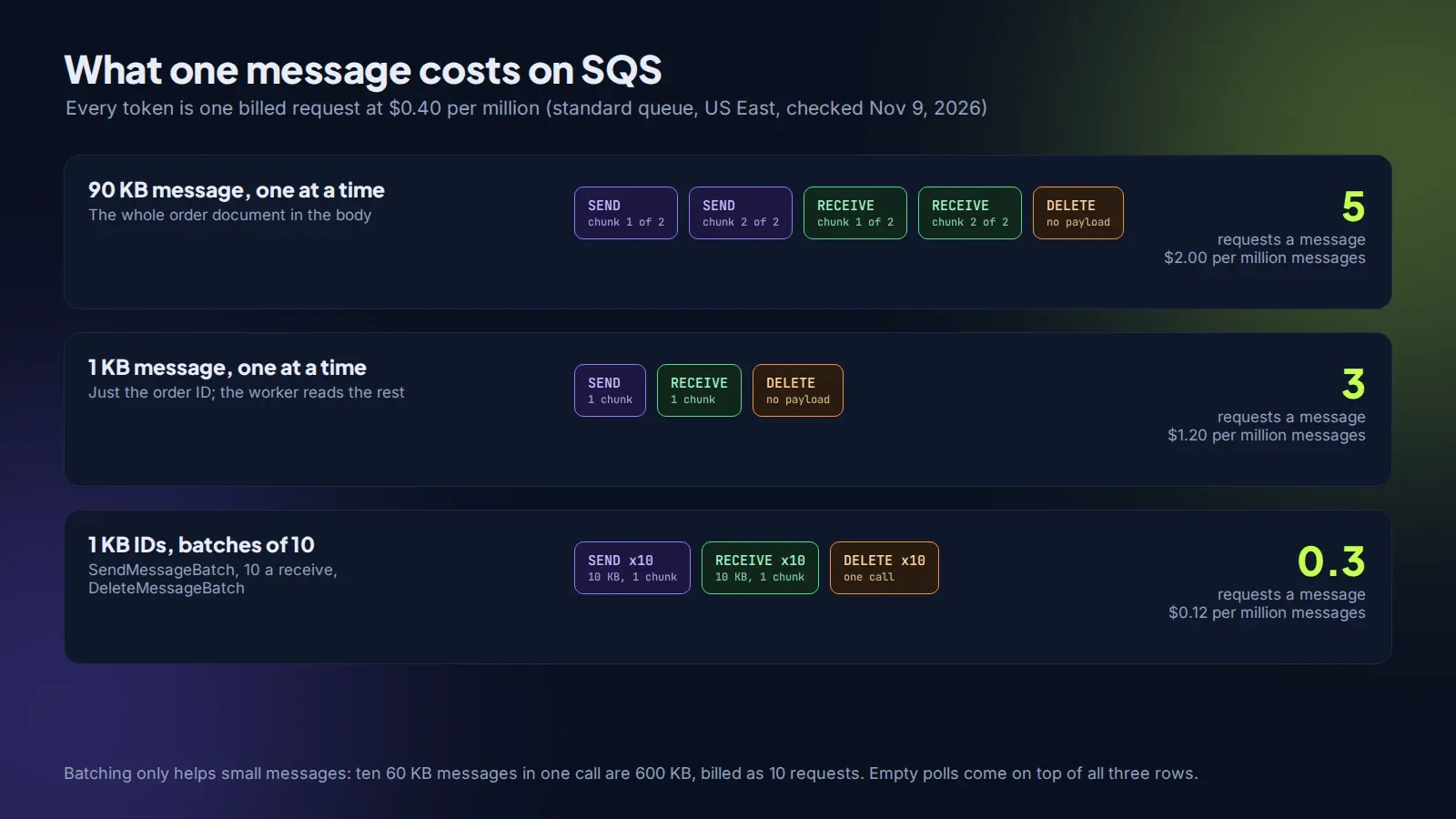
Neither number is a large line on most AWS bills. That’s the point of showing it: the first version is what you get by following the getting-started code, and the queue is the kind of line nobody looks at until it’s one of twenty that crept up the same way.
Lines that hide under other services
Encryption. SSE-SQS, with keys SQS manages, is free. With your own KMS key, SQS calls KMS for data keys and you pay KMS’s $0.03 per 10,000 requests under Key Management Service. The data key reuse period (300 seconds by default, up to 24 hours) decides how often that happens.
Big payloads through S3. The Extended Client Library stores large messages in S3 and sends a pointer. The queue gets cheaper; you now pay S3 PUT, GET and storage instead.
SNS in front. Fanning out with SNS costs $0.50 per million publishes after the first million, and SNS delivery to SQS queues is free (from the SNS pricing page, Price List published November 4, 2026). Each subscribed queue then pays its own receives and deletes, so five queues on one topic is five times the consuming side.
When a queue in Postgres is enough
If your app already runs on Postgres and the queue holds a few thousand jobs a day, you may not need SQS at all. Supabase Queues is built on the pgmq extension and lives inside the database you already pay for, with no per-request line. Apps built in Lovable often sit on Lovable Cloud, where you don’t manage the database yourself and extensions go through Lovable’s allowlist; Lovable 2 Live moves those apps to your own Supabase project if you want that control. SQS still wins when you need very high throughput, other AWS services reading the queue, or a queue that keeps working while the database is down.
Try your own numbers in our SQS pricing calculator, which counts the 64 KB chunks, batching and empty polls for you. If the queue is one of many lines on your bill, our free cloud cost audit costs $0 and reads all of them. When there’s real money to save, we reduce startup AWS bills for $0 up front, paid as 50% of the verified monthly saving for 6 months, then nothing. If nothing is saved, you owe nothing.
Want us to look at your bill?
No upfront fee: for six months you pay half of what we save you each month, then you keep all of it. Nothing saved, nothing owed.
Also here: Free cloud cost audit ($0) · Cloud cost optimization services: $0 up front · Reduce your startup's AWS bill · FinOps for startups: $0 audit · Pricing: paid only from verified savings · Move from AWS to a European cloud