
aws lightsail · pricing · aws
AWS Lightsail Pricing: What the $5 Bundle Leaves Out
By Aakash Verma ·
How much does AWS Lightsail cost? On the Lightsail pricing page, checked November 23, 2026, a Linux instance with a public IPv4 address starts at $5 a month for 0.5 GB of RAM, 20 GB of SSD and 1 TB of data transfer. The 2 GB bundle most small apps end up on is $12, and an IPv6-only version of each bundle is $1.50 to $4 cheaper. The bundle price covers the server, the disk, the address and the transfer allowance. Almost everything else is extra.
That last sentence is the whole post. People compare Lightsail’s $12 with an EC2 instance’s hourly rate and conclude it’s cheap, which it usually is. What they don’t price is the transfer overage, the load balancer, the database and the snapshots, which is where a $12 server becomes a $90 bill.
The bundles in the US
| Bundle (Linux, IPv4) | Per month | IPv6-only | vCPUs | SSD | Transfer |
|---|---|---|---|---|---|
| 0.5 GB | $5 | $3.50 | 2 | 20 GB | 1 TB |
| 1 GB | $7 | $5 | 2 | 40 GB | 2 TB |
| 2 GB | $12 | $10 | 2 | 60 GB | 3 TB |
| 4 GB | $24 | $20 | 2 | 80 GB | 4 TB |
| 8 GB | $44 | $40 | 2 | 160 GB | 5 TB |
| 16 GB | $84 | $80 | 4 | 320 GB | 6 TB |
| 32 GB | $164 | $160 | 8 | 640 GB | 7 TB |
There are also compute optimized bundles (from $42 for 4 GB with 2 vCPUs) and memory optimized ones (from $74 for 16 GB), and Windows starts at $9.50. One footnote on the pricing page is easy to miss: servers created on or before June 29, 2023 have 1 vCPU on the small bundles, not 2. If yours is that old, a fresh instance from a snapshot gets you the second core at the same price.
The IPv6-only bundles are cheaper because they skip the public IPv4 address, which AWS now charges for everywhere else. The Lightsail FAQ also says static IPs can’t be attached to them. Fine for a backend that only talks to a load balancer or Cloudflare. A bad idea for anything an old corporate network has to reach directly.
The transfer allowance, and the $0.09 after it
The allowance sounds huge. It mostly is. But read how it’s counted: “Both inbound and outbound data transfer count towards your data transfer allowance,” and “only outbound data transfer in excess of your plan’s data transfer allowance is subject to overage charges.” In US regions that overage is $0.09 a GB, so 1 TB over costs $92.16. On a $12 server.
Two details help. The allowance is pooled across instances of the same bundle in a region (two 2 GB instances share 6 TB), and it resets every month. One detail hurts: plans in Mumbai, Sydney, Jakarta, Malaysia, Hong Kong and Sao Paulo get half the allowance, and the overage there runs $0.1093 to $0.15 a GB.
Who actually goes over? Instances serving video or large downloads, apps that push nightly backups to another provider, and APIs returning big responses to mobile apps. A typical SaaS dashboard will never get close.
The extras that make the bill
From the same pricing page and the AWS price list for Lightsail (published November 13, 2026):
- Managed databases: $15 for 1 GB standard, $30 with high availability. The $15 plan is the only one listed without encryption, so the real entry price for most apps is $30 (2 GB, encrypted), or $60 with high availability.
- Load balancer: $18 a month flat.
- Block storage: $0.10 per GB-month. Snapshots: $0.05 per GB-month, manual and automatic alike.
- Static IP: free while attached, $0.005 an hour once it’s been unattached for more than an hour. About $3.65 a month for an address you forgot to release.
- Object storage buckets from $1 (5 GB), CDN distributions from $2.50 (50 GB), container services from $7 a month.
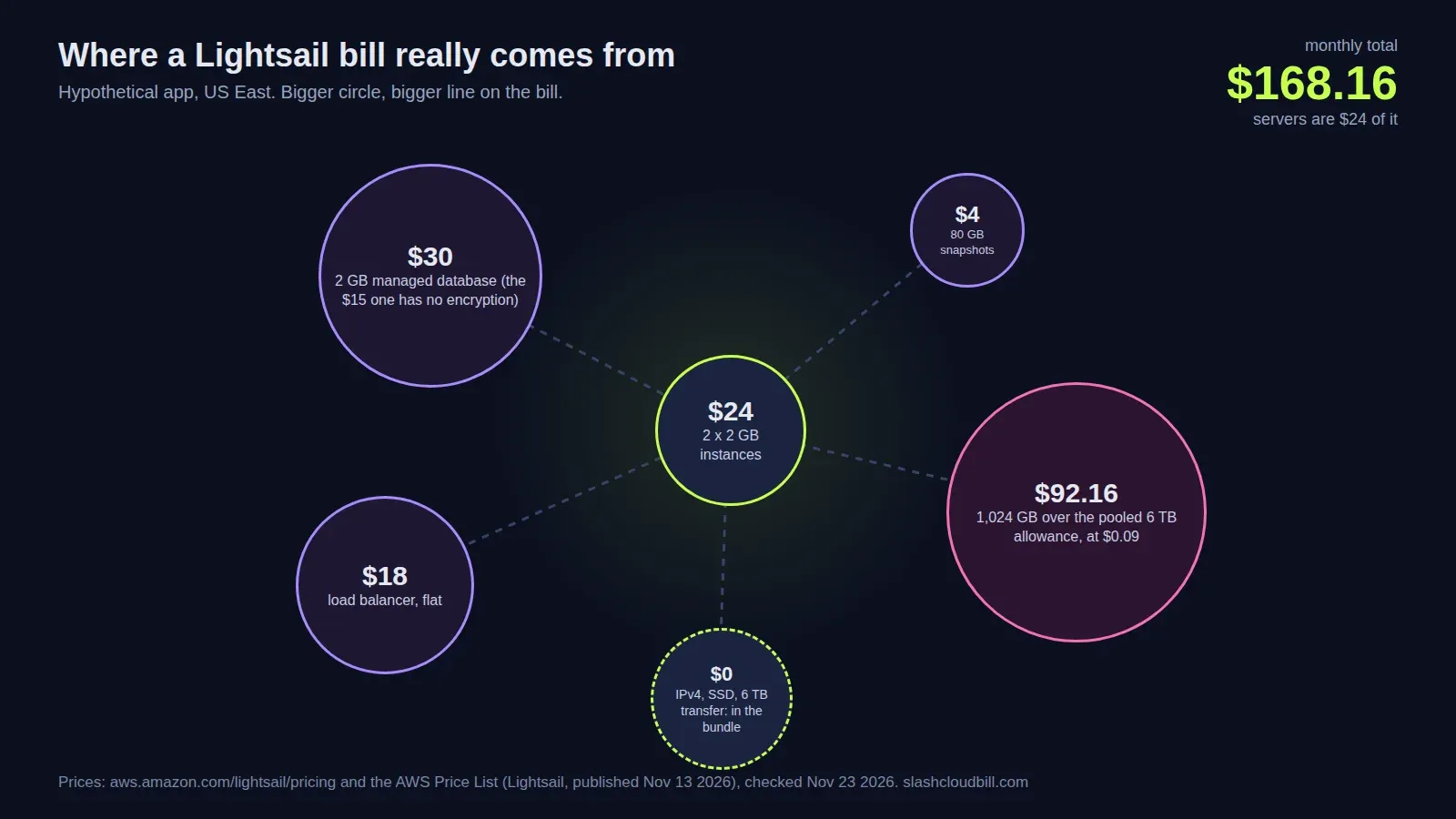
Here’s a hypothetical setup we see often: two 2 GB instances behind a load balancer “for redundancy”, a 2 GB managed database, 80 GB of snapshots, and 7 TB of outbound transfer. That’s $24 for the instances, $18 for the load balancer, $30 for the database, $4 for snapshots, and 7,168 GB used against a pooled 6,144 GB allowance, so 1,024 GB over at $0.09, which is $92.16. Total: $168.16 a month, of which the servers are $24.
Drop the load balancer, keep one instance on the 4 GB bundle, and move the downloads behind a CDN, and the same app is $24 plus the $30 database plus snapshots. You can try that kind of change in our Lightsail pricing calculator.
Lightsail vs EC2
For a small server, Lightsail is cheaper than the same thing on EC2, and the gap is mostly transfer. Take the $12 bundle against EC2 in US East, using AWS’s on-demand price file from November 21, 2026:
| Same 2 GB server, 500 GB out a month | Lightsail | EC2 |
|---|---|---|
| Instance | $12.00 (bundle) | $12.26 (t4g.small, $0.0168 an hour) |
| 60 GB SSD | included | $4.80 (gp3 at $0.08 a GB) |
| Public IPv4 | included | $3.65 ($0.005 an hour) |
| Transfer out | included | $36.00 (400 GB after the free 100 GB, at $0.09) |
| Total | $12.00 | $56.71 |
So why does anyone use EC2 for small apps? Three reasons, and they’re real. EC2 has Savings Plans that cut the instance line by a quarter or more, which Lightsail doesn’t. EC2 scales to sizes and instance families Lightsail doesn’t offer, and plugs into autoscaling and the rest of AWS properly. And the FAQ itself says that if you need “consistently high CPU performance”, for video encoding or similar, use EC2.
The move between them is one way and partial. Lightsail can export an instance snapshot to EC2 for free (the EC2 resources then bill normally), but per the FAQ it doesn’t export load balancers, databases, static IPs or DNS records. Plan that move before you outgrow the bundles, not during an outage.
My opinion: for one or two servers with predictable traffic, Lightsail is the better deal on AWS, and I’d only leave it for the reasons above. If you’re also weighing hosts outside AWS, moving a Lovable app to your own server is the same decision from the app builder’s side, and our Hetzner vs AWS calculator prices the same box in Europe.
If Lightsail is one line on a bigger AWS bill, send it to our free cloud cost audit ($0, bill lines only, no logins). When there’s real money to cut, we reduce startup AWS bills for $0 up front, paid from 50% of the verified monthly saving for 6 months, and nothing if nothing is saved.
Want us to look at your bill?
No upfront fee: for six months you pay half of what we save you each month, then you keep all of it. Nothing saved, nothing owed.
Also here: Free cloud cost audit ($0) · Cloud cost optimization services: $0 up front · Reduce your startup's AWS bill · FinOps for startups: $0 audit · Pricing: paid only from verified savings · Move from AWS to a European cloud