
heroku · pricing · paas
Heroku Pricing: The Jump From $50 to $250 a Dyno
By Aakash Verma ·
Heroku pricing starts at $5 a month for Eco dynos and $7 for a Basic dyno, but a production app almost never stays there. Standard-1X is $25 a month for 0.5 GB of RAM, Standard-2X is $50 for 1 GB, and the next size up, Performance-M, is $250 for 2.5 GB. There is nothing in between on the regular runtime, and that gap is where a Heroku bill can triple in a month.
All prices below are from Heroku’s pricing page and the Dev Center, checked on November 16, 2026. The Heroku pricing calculator does the same sums for your own dynos and add-ons.
How Heroku bills
Heroku charges by wall-clock time, not CPU. Its usage and billing article (last updated September 9, 2026) puts it plainly: “Any dynos scaled above 0 accrue usage, regardless of traffic or activity.” Everything is prorated to the second, and the monthly price on the pricing page is the cap you hit if the dyno runs all month.
So an idle staging app with two Standard-2X dynos costs exactly what a busy one does. $100 a month for nothing, unless someone scales it to zero.
Add-ons work the same way. Heroku Postgres and Key-Value Store accrue usage as long as they exist, by the second. And you pay last month’s usage this month, which is why a change you make today shows up a month later.
The dyno ladder
| Dyno | RAM | Per month |
|---|---|---|
| Eco | 0.5 GB | $5 for a shared pool of 1,000 hours |
| Basic | 0.5 GB | $7 |
| Standard-1X | 0.5 GB | $25 |
| Standard-2X | 1 GB | $50 |
| Performance-M | 2.5 GB | $250 |
| Performance-L | 14 GB | $500 |
| Performance-L-RAM | 30 GB | $500 |
| Performance-XL | 62 GB | $750 |
| Performance-2XL | 126 GB | $1,500 |
Eco dynos sleep after 30 minutes without traffic, and an Eco app can run two dynos at most. Basic doesn’t sleep, but Heroku’s scaling limits allow only one dyno per process type on Eco and Basic. The moment you want two web dynos, or zero-downtime deploys with preboot, you’re on Standard at $25 or more each.
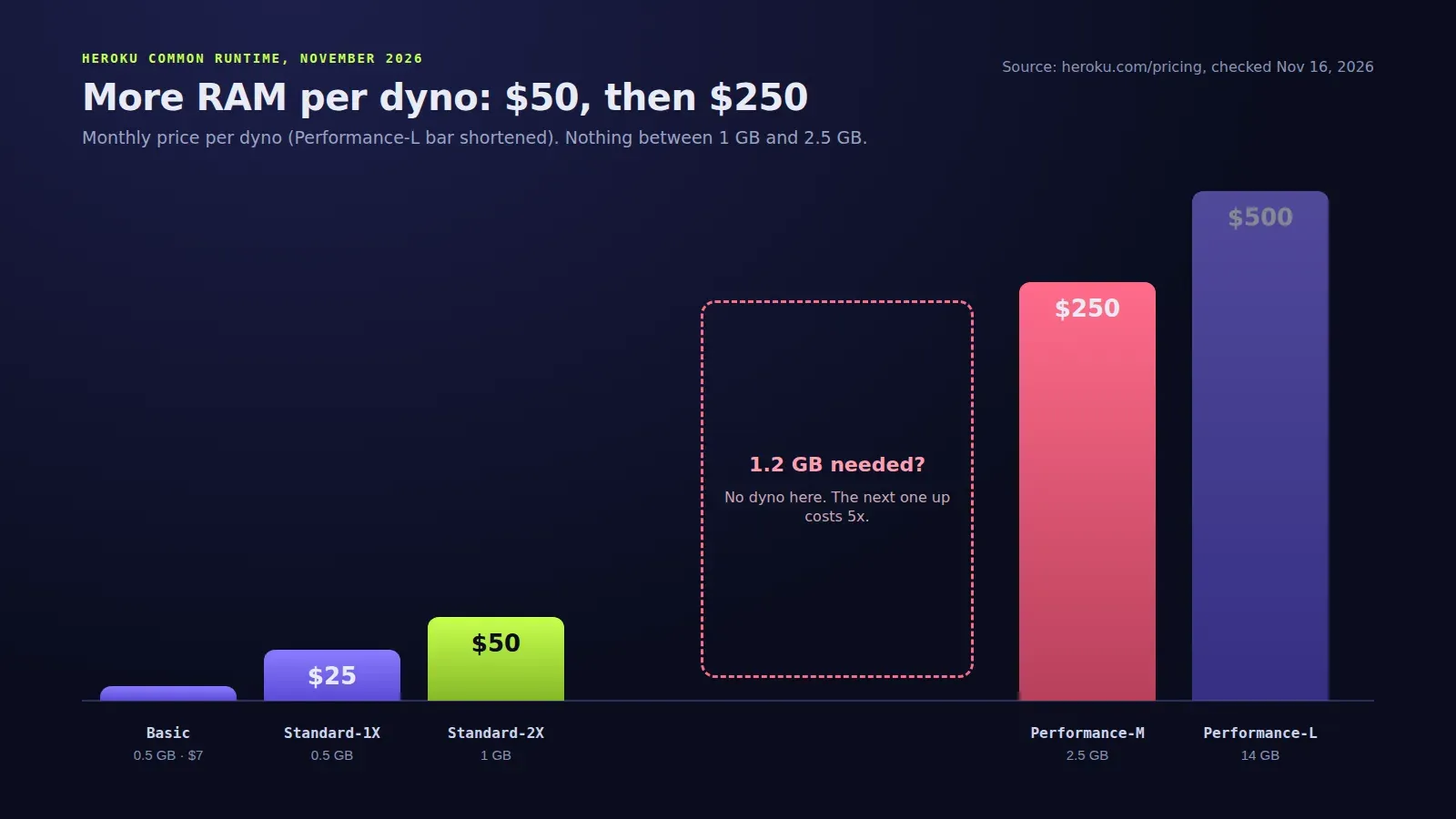
Look at the gap between the two middle rows. 1 GB costs $50. 2.5 GB costs $250. If your app needs 1.2 GB per process, the only way up on the Common Runtime is five times the price per dyno. The newer Fir dynos have in-between sizes (a General Purpose 2 vCPU, 4 GB dyno is $80), but every one of them needs a Private Space, so they don’t help a small team on the standard setup.
This is also why the R14 error matters. When a dyno goes over its memory, Heroku starts swapping and logs R14 - Memory quota exceeded. Teams see that, pick the next dyno up, and the bill jumps from $100 to $500 for two web dynos. Often the real fix is fewer workers per dyno (Puma or Gunicorn processes each hold their own copy of the app) or a memory leak in one route.
Postgres and Key-Value
The data add-ons have their own ladders. Postgres Essential-0 is $5 for 1 GB, Essential-1 is $9 for 10 GB and Essential-2 is $20 for 32 GB, all with 20 to 40 connections and no dedicated RAM. Standard-0 is $50 for a dedicated server with 4 GB of RAM and 64 GB of disk, Standard-2 is $200 for 8 GB and 256 GB, then $400, $750, $1,400 and up to $12,000 for Standard-10. Premium plans add high availability: Premium-0 is $200, four times Standard-0 for the same size.
Heroku Key-Value Store (Redis) starts at $3 for Mini (25 MB), then Premium 0 is $15 for 50 MB, Premium 2 is $60 for 250 MB and Premium 5 is $200 for 1 GB. That’s steep per megabyte. A Redis used only as a job queue rarely needs more than Premium 0; one used as a cache grows quietly until it’s the second-biggest line on the bill.
A worked example
A hypothetical SaaS on Heroku, with every price from the pricing page:
- 2 web dynos on Standard-2X: $100
- 1 worker on Standard-1X: $25
- Heroku Postgres Standard-0: $50
- Key-Value Store Premium 0: $15
- Heroku Scheduler running a 2-minute job every hour on a Standard-1X: 24 dyno hours a month, under $1
That’s about $191 a month. Now the app grows and the web dynos start logging R14 at 1 GB. Moving both to Performance-M takes the web line from $100 to $500, and the bill to about $591. If the database outgrows 64 GB at the same time, Standard-2 adds another $150. Same app, same team, roughly three times the bill in one quarter.
Before paying that, check two things. First, how many processes each dyno runs (WEB_CONCURRENCY): dropping from 3 to 2 often brings a Rails or Django app back under 1 GB. Second, whether you need two web dynos all day. Heroku’s autoscaling is only on Performance dynos, so on Standard the second dyno runs 24/7 whether anyone visits or not.
When to leave
Heroku is still the easiest place to run a small app, and $50 to $200 a month for no server work is a fair price. The maths changes past the $250 step. Two Performance-M dynos are $500 a month for 5 GB of RAM in total; a single dedicated server in Europe with far more memory costs a fraction of that, plus some setup. Our Hetzner vs AWS calculator shows the server prices, and moving to a European cloud is a fixed-price job from $1,500.
If you’d rather stay on Heroku and just pay less, our cloud cost optimization service costs $0 up front and then 50% of the verified monthly saving for 6 months, nothing if nothing is saved. Or start with the free cloud cost audit: $0, you send the bill lines, a person reads them and replies. For the database side compared across providers, see managed Postgres pricing, and for other app platforms, Render pricing and Railway pricing.
Want us to look at your bill?
No upfront fee: for six months you pay half of what we save you each month, then you keep all of it. Nothing saved, nothing owed.
Also here: Free cloud cost audit ($0) · Cloud cost optimization services: $0 up front · Reduce your startup's AWS bill · FinOps for startups: $0 audit · Pricing: paid only from verified savings · Move from AWS to a European cloud