
openai · llm · pricing
OpenAI API Pricing: Cache Writes Now Cost 1.25x
By Aakash Verma ·
OpenAI’s current API models cost between $0.10 per million input tokens (gpt-6-luna) and $10 (gpt-6-astra), with output at five times the input price on the GPT-6 family. That part is easy to read. The part that surprises people is a column most pricing summaries skip: on GPT-5.6 and every GPT-6 model, writing a prompt into the cache is billed at 1.25 times the normal input price. On older models it was free. All figures below are from OpenAI’s API pricing page, checked on October 26, 2026, standard processing, prompts up to 272k tokens.
The models people actually use
| Model | Input | Cached input | 30-min cache write | Output |
|---|---|---|---|---|
| gpt-6-astra | $10.00 | $1.00 | $12.50 | $50.00 |
| gpt-6.1-sol | $2.00 | $0.10 | $2.50 | $10.00 |
| gpt-6-sol | $2.00 | $0.20 | $2.50 | $10.00 |
| gpt-6-luna | $0.10 | $0.01 | $0.125 | $0.50 |
| gpt-5.6-sol | $4.00 | $0.40 | $5.00 | $20.00 |
| gpt-5.6-terra | $2.00 | $0.20 | $2.50 | $12.00 |
| gpt-5.5 | $5.00 | $0.50 | none | $30.00 |
| gpt-5.4-mini | $0.75 | $0.075 | none | $4.50 |
| gpt-5-mini | $0.25 | $0.025 | none | $2.00 |
| gpt-4o-mini | $0.15 | $0.075 | none | $0.60 |
Per million tokens. Two things in that table we’d point out to anyone choosing a model today.
gpt-6.1-sol and gpt-6-sol have the same input and output price, but 6.1 reads from the cache at half the price ($0.10 against $0.20). If your prompts repeat a lot, there’s no reason to stay on 6-sol.
And the “cheap” models from last year aren’t the cheap ones anymore. gpt-6-luna costs less than gpt-4o-mini on input and output. Plenty of codebases still call gpt-4o-mini or gpt-5.4-mini because someone picked it as the budget option in 2025 and nobody looked again.
Also worth knowing before you plan around a number: OpenAI says gpt-5.6-sol is on promotional pricing “at least through November 21, 2026”, data residency endpoints add 10% for models released since March 5, 2026, and what used to be called Priority processing was renamed Fast on July 30 and costs double (gpt-6.1-sol input goes to $4).
The cache write column
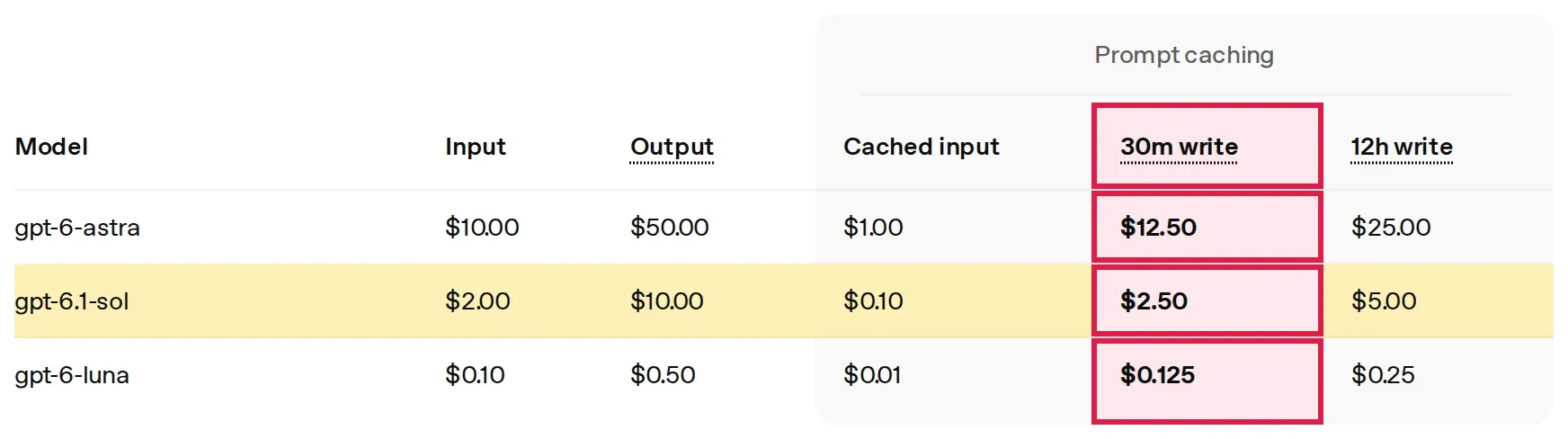
Here’s how the prompt caching guide describes it for GPT-5.6 and later: a cache write costs 1.25x the uncached input rate with the default 30-minute lifetime, or 2.5x if you ask for 12 hours. Reads cost 0.1x (0.05x on gpt-6.1-sol). Every input token is billed at exactly one of the three rates, uncached, cached or write, so the write rate replaces the input price for those tokens rather than being added on top.
That’s a good deal for a prefix you reuse. OpenAI’s own maths: write once and reuse nine times and you pay 2.15x the input cost, against 10x without caching.
The catch is where the write ends. In implicit mode, which is what you get if you never touch the cache settings, OpenAI places the breakpoint at the end of the latest user message. So the new part of every request, the user’s question, the fresh tool output, the latest turn, gets written to the cache at 1.25x, whether anything ever reads it again or not. For a chat app that appends to a thread, a lot of that does get read on the next turn. For a one-shot endpoint (classify this ticket, summarise this page) most of it never is.
Explicit mode is the fix. You set prompt_cache_options.mode to explicit and put a breakpoint after the part that really repeats: the system prompt, the tool definitions, the reference docs. Everything after the last breakpoint is billed at the plain input rate with no write charge. It’s a request parameter, not a rewrite.
One workload, priced
Same example we used for Gemini, so you can compare: a support assistant doing 5,000 requests a day, 3,000 input tokens each, 400 tokens back, half the input served from the cache. Over 30 days that’s 450 million input tokens and 60 million output.
On gpt-6.1-sol in the default implicit mode, the uncached half is written to the cache on every call:
- cached reads: 225M x $0.10 = $22.50
- cache writes: 225M x $2.50 = $562.50
- output: 60M x $10 = $600.00
- $1,185.00 a month
Switch to explicit mode with the breakpoint after the stable prefix and the changing half is billed at $2.00 instead of $2.50: $1,072.50. That’s $112.50 a month, about 10%, for one parameter. The stable prefix still has to be written, but with a request every 17 seconds it never expires, so that’s a few cents a day.
The rest of the table for the same traffic, implicit mode where it applies:
| Model | Per month |
|---|---|
| gpt-6-astra | $6,037.50 |
| gpt-5.6-terra | $1,327.50 |
| gpt-6-sol | $1,207.50 |
| gpt-6.1-sol | $1,185.00 |
| gpt-6.1-sol, Batch | $592.50 |
| gpt-5.4-mini | $455.63 |
| gpt-5-mini | $181.88 |
| gpt-4o-mini | $86.63 |
| gpt-6-luna | $60.38 |
For comparison, Gemini 3.8 Flash runs the same workload for $410.63 today and $821.25 from January.
The Batch API halves every rate, cache writes included, and returns results within 24 hours. Flex processing is billed at Batch prices on a normal request, in exchange for slower answers and the odd “resource unavailable” error, which makes it the better fit for evals and nightly jobs that call the API one request at a time.
Web search is its own line
The web search tool costs $10 per 1,000 calls, plus the search content tokens fed into the model at its normal input rate. An assistant that searches on 1,000 requests a day pays $300 a month in calls before a single token. If search is on by default in your tool list, check how often the model actually uses it.
Where we’d start
Pull the usage page for the last 30 days and split it by model. If anything runs on gpt-5.6 or a GPT-6 model, look at the cached and uncached token counts: lots of cache writes and few reads means implicit mode is writing things nobody reuses. Then move the jobs that can wait to Batch, and test gpt-6-luna on the tasks a “mini” model does today.
Put your own numbers into the OpenAI API pricing calculator, which has the write rate, Batch, Flex and Fast in it. Our Claude API pricing post covers the same levers on Anthropic’s side.
If your app was built with Lovable and calls OpenAI from a Supabase edge function, open that function and check the prompt order. User text first and the long instructions after it means the cache never matches anything. The AI line is only part of that bill, too: Lovable 2 Live’s free Lovable cost check covers the hosting and database side.
Want us to look at your bill?
No upfront fee: for six months you pay half of what we save you each month, then you keep all of it. Nothing saved, nothing owed.
Also here: Free cloud cost audit ($0) · Cloud cost optimization services: $0 up front · Reduce your startup's AWS bill · Pricing: paid only from verified savings · Move from AWS to a European cloud