
sentry · pricing · monitoring
Sentry Pricing: Your Trace Sample Rate Sets the Bill
By Aakash Verma ·
Sentry pricing starts at $0 for one user and $29 a month for the Team plan ($26 billed yearly), which includes 50,000 errors, 5 million spans and 50 session replays. Business is $89 a month ($80 yearly) with the same included volume. Everything past that is billed per unit, and on most bills we look at, errors aren’t the big line. Spans are, and the number of spans you send is set by one value in Sentry.init.
The prices below are from Sentry’s pricing page and the per-unit tables in its pricing docs, checked on November 12, 2026.
What the plans include
| Developer | Team | Business | |
|---|---|---|---|
| Price a month | $0 | $29 ($26 yearly) | $89 ($80 yearly) |
| Users | 1 | Unlimited | Unlimited |
| Errors | 5,000 | 50,000 | 50,000 |
| Spans | 5M | 5M | 5M |
| Session replays | 50 | 50 | 50 |
| Lookback | 30 days | Up to 90 days | Up to 90 days |
Team and Business also include 5 GB of logs, 5 GB of application metrics, 1 GB of attachments, one uptime monitor and one cron monitor. Business adds unlimited dashboards, error-message and release filters, the “Delete & Discard” button and per-key rate limits. Those last three matter for cost more than the dashboards do.
The per-unit prices
Over the included volume you pay one of two ways. Reserved volume is bought in advance at a lower price and expires at the end of each billing month. Pay-as-you-go comes out of a budget you set, and costs 25% more per unit. The first paid band of each line:
| Line | Team, pay-as-you-go | Team, reserved | Business, pay-as-you-go |
|---|---|---|---|
| Errors, 50K to 100K | $0.0003625 | $0.00029 | $0.0011125 |
| Errors, 100K to 500K | $0.0002188 | $0.000175 | $0.000625 |
| Spans, 5M to 100M | $0.000002 | $0.0000016 | $0.000004 |
| Replays, 50 to 5,000 | $0.00375 | $0.003 | $0.00375 |
| Attachments, per GB | $0.3125 | $0.25 | $0.3125 |
| Logs, per GB | $0.50 | pay-as-you-go only | $0.50 |
| Cron monitors | $0.78 each | pay-as-you-go only | $0.78 each |
| Uptime monitors | $1.00 each | pay-as-you-go only | $1.00 each |
Read the Business column twice. An error costs about three times as much on Business as on Team, and a span twice as much. Sentry’s docs say it plainly: upgrading recalculates your pay-as-you-go budget at Business prices, “so it may be consumed faster”. People move to Business for SAML or the filters and then wonder why the budget ran out on the 20th.
Profiling is pay-as-you-go only, at $0.0315 per continuous profile hour and $0.25 per UI profile hour. Seer, the AI root-cause feature, costs extra and moves to credit-based billing on December 8, 2026, so we’ve left it out of the numbers here.
A worked bill
A hypothetical SaaS app on Team, paying monthly and running everything as pay-as-you-go. The frontend was set up from the quick-start snippet, which ships with tracesSampleRate: 1.0, so every request and page load is traced.
| Line | Usage | Monthly cost |
|---|---|---|
| Team plan | $29.00 | |
| Errors | 98,000 (48,000 over) | $17.40 |
| Spans | 60M (55M over) | $110.00 |
| Session replays | 4,850 (4,800 over) | $18.00 |
| Logs | 12 GB (7 over) | $3.50 |
| Cron monitors | 5 (4 over) | $3.12 |
| Uptime monitors | 3 (2 over) | $2.00 |
| Attachments | 5 GB (4 over) | $1.25 |
| Total | $184.27 |
Spans are $110 of it. Drop tracesSampleRate to 0.2 and the same traffic sends about 12 million spans: 7 million over the allowance, $14. The bill becomes $88.27. You still get performance data, from a fifth of the requests, which is plenty for anything with real traffic. If some routes matter more (checkout, login), tracesSampler lets you keep those at 1.0 and sample the rest.
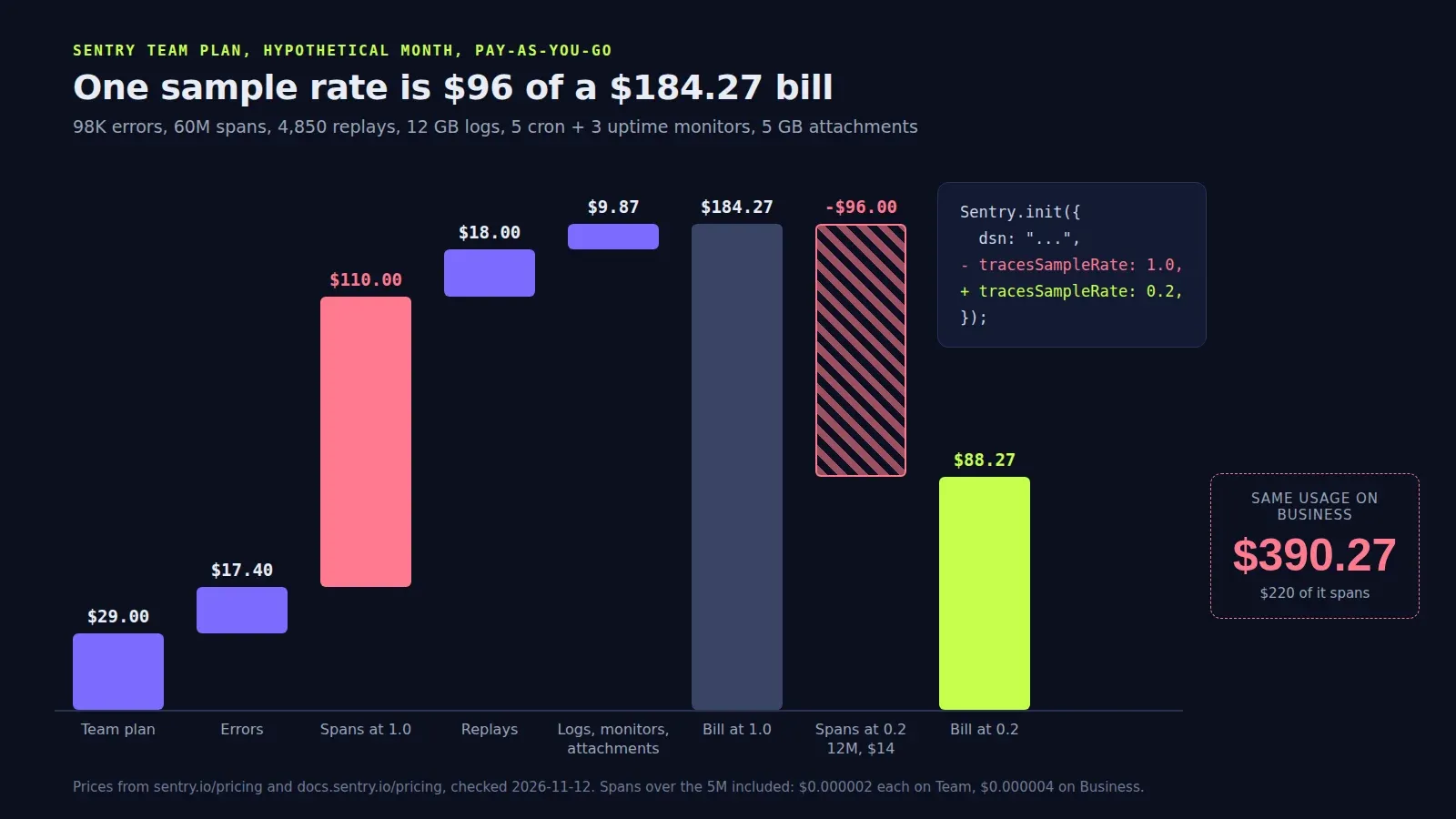
The same usage on Business, pay-as-you-go, is $390.27: $53.40 for errors and $220 for spans. Reserving the volume on Team instead of paying as you go brings the original bill to $154.94, but only if you guess the volume right, since unused reserved events don’t roll over.
The settings that move the number
Most of what lowers a Sentry bill is in your own code and project settings, not in the plan picker.
tracesSampleRate is the big one, as above. replaysSessionSampleRate and replaysOnErrorSampleRate decide how many sessions are recorded; the usual setup records a small share of normal sessions and all sessions with an error, which keeps replays tied to bugs. In the JavaScript SDK, ignoreErrors skips errors by message, and beforeSend can drop anything by returning null, before it ever leaves the browser.
On the server side, Sentry’s guide to managing the event stream lists inbound filters for browser extension errors, localhost, legacy browsers and web crawlers. Filtered events don’t count toward your quota (“Only accepted events affect your quota”), and they’re free to turn on, on every plan. A noisy browser extension can be thousands of errors a month on its own.
One thing to know about the budget: when your reserved volume and pay-as-you-go budget are both used up, Sentry drops new data and doesn’t charge for it. So a cheap budget doesn’t fail with a big invoice, it fails with blind spots for the rest of the month. Set it a little above a normal month and let spike protection deal with the odd bad release.
Before you pick Business
If the reason is SSO or the filters, price your current usage at Business rates first. Our Sentry pricing calculator does both plans, monthly or yearly, pay-as-you-go or reserved, and shows what a lower trace sample rate would save. Monitoring tends to come in pairs on a bill, so if Datadog or PostHog is the other one, see Datadog pricing and PostHog pricing.
When the monitoring tools are a few of many usage-billed lines, the free cloud cost audit costs $0: send the bill lines and we reply by email with what’s worth cutting. Our cloud cost optimization service is $0 up front, then 50% of the verified monthly saving for 6 months, and nothing if nothing is saved.
Want us to look at your bill?
No upfront fee: for six months you pay half of what we save you each month, then you keep all of it. Nothing saved, nothing owed.
Also here: Free cloud cost audit ($0) · Cloud cost optimization services: $0 up front · Reduce your startup's AWS bill · FinOps for startups: $0 audit · Pricing: paid only from verified savings · Move from AWS to a European cloud