
aws fargate · aws · pricing
AWS Fargate Pricing: You Pay for the Size, Not the Load
By Aakash Verma ·
AWS Fargate pricing looks simple on the page, and it is. Two meters: one for vCPU, one for memory, both by the hour, billed per second. What makes Fargate bills bigger than they should be is not a hidden fee. It’s that you pay for the size you reserved, every second the task is up, whether it’s serving a thousand requests or none.
All prices below are for Linux tasks in US East (N. Virginia), from the AWS Fargate pricing page, checked against the AWS Price List API on October 17, 2026.
The two meters
| x86 | Arm (Graviton) | |
|---|---|---|
| per vCPU per hour | $0.04048 | $0.03238 |
| per GB of memory per hour | $0.004445 | $0.00356 |
Billing starts when Fargate begins pulling your container image and stops when the task ends, rounded up to the second, with a one-minute minimum. Every task gets 20 GB of ephemeral storage included; anything you configure above that is $0.000111 per GB-hour, which is small enough to ignore unless you’re running big batch jobs on 200 GB disks.
A month is about 730 hours, so a task that runs all month at 1 vCPU and 2 GB on x86 costs 730 × ($0.04048 + 2 × $0.004445) = $36.04. That one number is worth remembering, because almost any Fargate setup is some multiple of it.
You pay for what you reserve
This is the part people miss. Fargate doesn’t measure how busy your container is. A task defined at 1 vCPU sits at 4% CPU through the night and pays for the whole vCPU. The task definition is the bill.
And task definitions are rarely sized from data. They’re copied from a tutorial, or bumped once during an incident (“give it 2 GB, see if the OOM stops”) and never brought back down. You can’t pick any size you like either. Sizes come in fixed CPU and memory combinations: 0.25 vCPU takes 0.5 to 2 GB, 0.5 vCPU takes 1 to 4 GB, 1 vCPU takes 2 to 8 GB, and so on up to 16 vCPU with 120 GB. So “a bit less memory” sometimes means stepping down a whole CPU size too, which is fine, because that’s usually the bigger saving.
Before changing anything, look at a week of CPU and memory in CloudWatch Container Insights. If a service averages under 20% CPU and uses less than half its memory, it’s oversized, and the next size down is the cheapest fix on the bill. Google Cloud Run is the opposite model by default: it bills CPU only while a request is being handled, plus a fee per million requests, which suits a service that idles most of the night. We compared its two billing modes in Cloud Run pricing, and the Cloud Run pricing calculator prices the same traffic both ways.
The same service, four ways
Here’s one hypothetical web service running two tasks, priced with the numbers above:
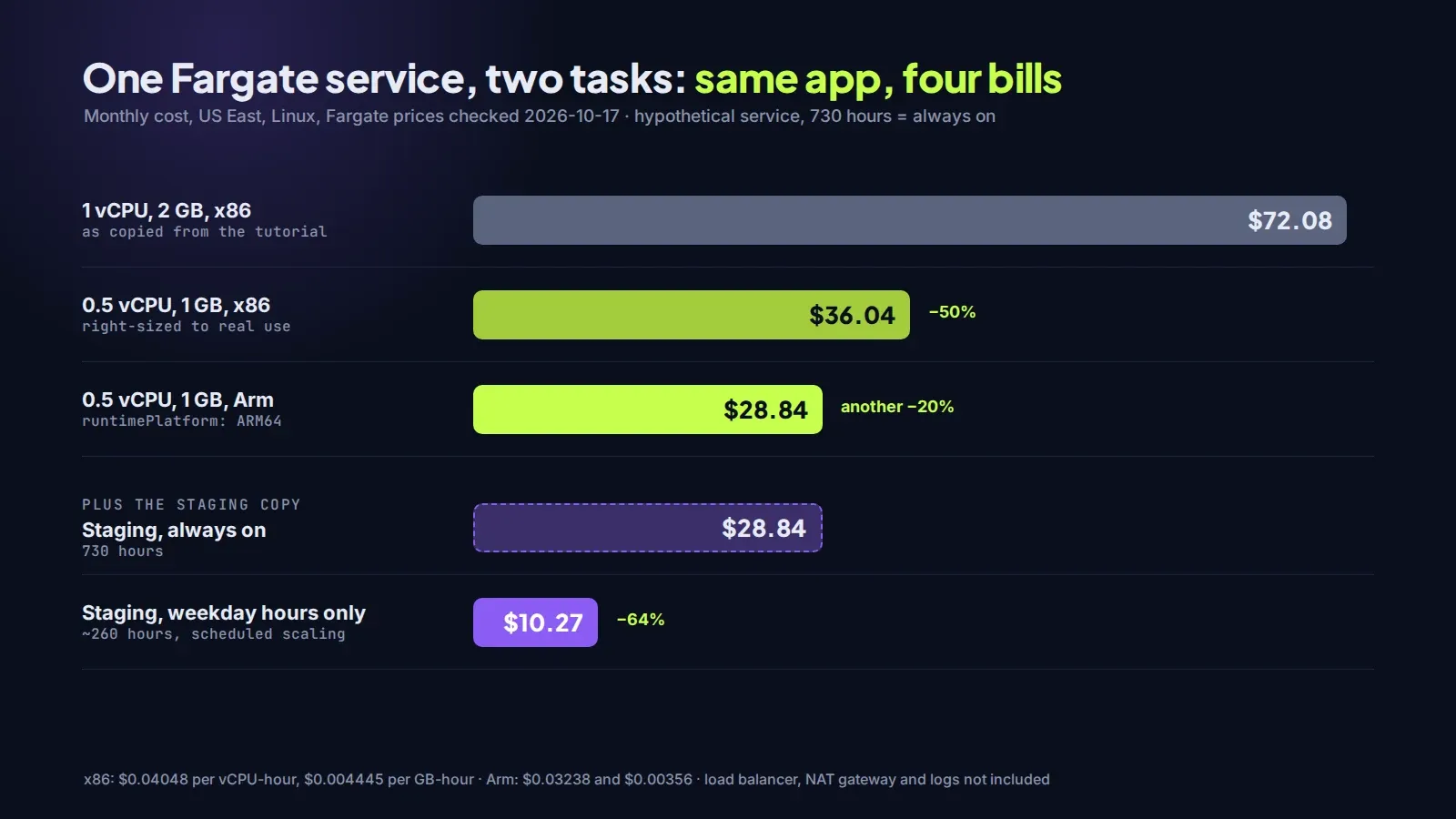
Two tasks at 1 vCPU and 2 GB on x86, always on: $72.08 a month.
Right-sized to 0.5 vCPU and 1 GB, still x86: $36.04. Half the bill, and for a typical Node or Python API that sits mostly idle between requests, nobody notices the difference.
The same right-sized tasks on Arm: $28.84. Graviton is 20% cheaper on both meters. Most Node, Python and Go images only need a multi-arch build (docker buildx build --platform linux/arm64) and runtimePlatform set to ARM64 in the task definition. Images with native binaries need testing first.
Then there’s the copy nobody looks at. A staging environment with the same two tasks, running around the clock, costs another $28.84. Scaled to zero outside weekday working hours, roughly 260 hours a month instead of 730, it costs $10.27. ECS can do that with scheduled scaling on the service’s desired count, no extra tooling.
None of these changes touches the code. That’s why Fargate is usually the first line we check.
Fargate Spot, for the jobs that can stop
Fargate Spot runs tasks on spare capacity for up to 70% off. The catch is that AWS can take the capacity back with a two-minute warning, and the Spot price itself moves over time. It’s a good fit for queue workers, scheduled jobs and anything that can pick up where it left off. It’s a bad fit for the web tier unless you mix it with regular tasks through a capacity provider strategy, so there’s always something on-demand answering requests.
For a steady baseline you’ll keep for a year or more, Compute Savings Plans also apply to Fargate. Commit to the baseline only after you’ve right-sized, or you’re locking in the waste. How big that commitment should be, and why sizing it to your daytime peak can cost more than paying On-Demand, is worked through in AWS Savings Plans: commit to your quietest hour.
The lines next to Fargate are often bigger
A Fargate service rarely runs alone. An Application Load Balancer in front of it costs $0.0225 an hour, $16.43 a month, before its capacity units ($0.008 per LCU-hour) (Elastic Load Balancing pricing). Tasks in private subnets that reach the internet through a NAT gateway pay for the gateway by the hour and for every gigabyte it processes, including image pulls from Docker Hub and calls to Stripe or OpenAI (VPC pricing). For a small service, the load balancer plus NAT can easily cost more than the tasks themselves.
So when the Fargate line looks reasonable and the total doesn’t, look one line over. VPC endpoints for ECR and S3 keep image pulls off the NAT gateway, and one shared load balancer with path-based rules can serve several small services instead of one each.
To price your own tasks, the AWS Fargate pricing calculator takes task size, count and hours, flags combinations Fargate doesn’t offer, and shows the same setup on the other architecture.
Want us to look at your bill?
No upfront fee: for six months you pay half of what we save you each month, then you keep all of it. Nothing saved, nothing owed.
Also here: Free cloud cost audit ($0) · Cloud cost optimization services: $0 up front · Reduce your startup's AWS bill · FinOps for startups: $0 audit · Pricing: paid only from verified savings · Move from AWS to a European cloud